

An export packing list is not an attachment to the commercial invoice. It is the only document customs at the destination port uses when they open a container, and the only one your customer's warehouse uses to count and shelve the goods. With a properly laid-out A4 Excel template, you fill in each header field in order and finish a document you can send straight to the customer in 15 minutes. Below, the fields, the steps and the errors customs flags most.
What fields go on an export packing list, and what exactly goes in each one?
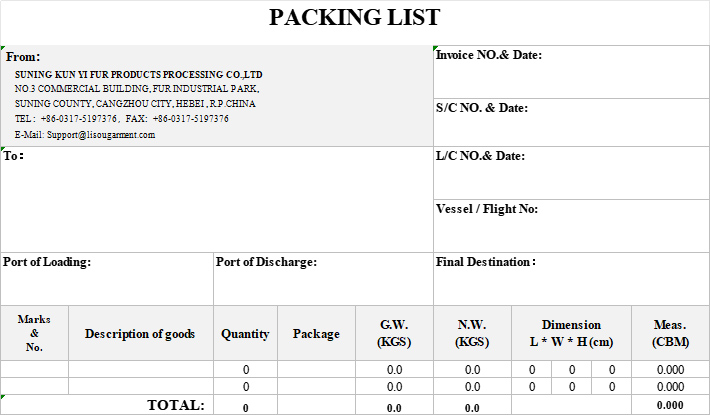
A packing list answers one question: what is in this carton, how heavy is it, and how big is it. Customs uses it to check the goods against the declaration. The customer's warehouse uses it to count stock in. Miss one field and the other side has to email you — the communication cost of that shipment doubles immediately.
A standard packing list carries at least 9 fields. When a letter of credit specifies field names, copy them word for word. Do not rewrite them into something you think reads better.
| Header field | What to enter | What goes wrong |
|---|---|---|
| Invoice No. | Exactly the same as the commercial invoice | Documents do not match, the bank rejects them at document check |
| Consignee | Full company name + address + phone | The destination port cannot locate the receiver |
| Shipping Marks | Identical, character for character, to the marks stencilled on the cartons | Customs cannot match cartons during inspection |
| Description | Same as the invoice and the customs declaration | Treated as a false declaration |
| Quantity | State the unit: PCS / SET / CTN | The customer's count does not match |
| Net Weight | Goods only | Mixed up with gross weight, declared weight is off |
| Gross Weight | Goods + outer carton + lining + pallet | The forwarder books the wrong weight |
| Measurement | L × W × H × number of cartons, in CBM | Writing cm³ makes the customer pick the wrong container type |
| Packages | Total cartons and pallets listed separately | Shortage or overage at warehouse receiving |
Net weight and gross weight are the two columns people get wrong most. Net weight covers the goods only. Gross weight includes the outer carton, the lining and the pallet. Calculate volume as outer carton L × W × H × number of cartons, and always use CBM, never cm³.
How to fill the Excel template: a 6-step workflow for one real shipment
Once you have the template, do not start typing numbers. Lock down the file name and the header block first. That alone cuts most of the rework.
- Create a new file and name it after the invoice number, e.g. PL-2026-0312.xlsx. One shipment, one file name, always.
- Fill the header block: exporter, consignee, invoice number, issue date, vessel and voyage, port of loading and port of discharge.
- Fill the shipping marks: main mark and side mark on separate lines. Check them word for word against the artwork the workshop is actually stencilling from before you go any further.
- Enter description, specification, quantity and unit price line by line. Whether to show unit price depends on the customer. Middle East and South American buyers often ask you to leave it off.
- Calculate net weight, gross weight and volume, then put a SUM total at the bottom of each column so weights never get left behind when quantities change.
- Open print preview and confirm it fits on one A4 page. Export to PDF and send that. Never send the editable Excel file.
Name files as 'PL-invoice number-customer short name'. When the customer comes back six months later looking for a document, they find it in three seconds. When several specifications ship together, give each its own row. Do not cram them into one cell separated by commas, because customs cannot read that.
How packing list, commercial invoice, weight list and measurement list relate
The commercial invoice says what the deal is worth. The packing list says what the cargo looks like. The invoice number on both must match. When the letter of credit separately requires a Weight List and a Measurement List, pull the matching columns out of the packing list onto their own page. The data must not contradict itself.
The practical approach: keep the packing list on the main worksheet, add a 'Weight' and a 'Measurement' worksheet, and export whichever one is needed. No double entry. All three sheets share one set of base data, so one change updates everything.
The three errors customs and customers catch most, and how to avoid them
- Shipping marks do not match the cargo. The salesperson fills the document from the marks in the customer's email while the workshop stencils from the previous artwork, and nothing matches at the destination port. Before shipping, photograph one carton's marks and check them side by side with the document.
- Gross and net weight mixed up. Gross weight typed into the net weight column makes the declared weight lighter than reality, and you will be explaining yourself at the re-weighing during inspection. Ask the forwarder to send back the warehouse intake weight and use the warehouse's measured figure.
- Only the total carton count listed. For palletised cargo, write 'XX CTNS IN XX PLTS'. The customer's warehouse receives by pallet. Carton numbers alone cost them two extra hours of depalletising and counting.
- Units missing. A bare number in the quantity column leaves the customer unsure whether it means cartons or pieces, which is a reliable source of pricing disputes.
Why template layout changes how customers judge you
What the customer receives is a PDF, not the Excel file. Font, row height, borders, whether it fits on one page: that is the first impression when they open the file. Same shipment, but one document can be filed straight away while the other has to be zoomed three times before it is legible. That gap is where professionalism shows.
When you host the template on your site for customers to download, page speed is part of the experience too. Past 3 seconds on mobile, about 53% of users leave (Google data). The 2026 Core Web Vitals pass line is LCP ≤ 2.5s, INP ≤ 200ms, CLS ≤ 0.1. Offer both PDF and xlsx versions in a download area on your own site. That is far steadier than dropping a cloud drive link. For details, see the file download notes in foreign trade website building services.
Documents, quotations and email signatures are one system. Track document versions for each shipment with the export sales rep customer follow-up Excel sheet, and file everything by customer in your business email client so you never rely on memory. To standardise everything from product pages to document downloads, start with B2B export website solutions and the version and pricing comparison, then decide how much to invest.
Frequently asked questions
Does a packing list need a company stamp or signature?
For ordinary T/T orders, a salesperson's signature or the company stamp is usually enough. Under a letter of credit, follow the L/C terms. If it calls for a handwritten signature, sign by hand. If it calls for a stamp, do not just print a name. Checking the L/C clause by clause before you prepare documents is far less trouble than a rejected document set afterwards.
Can I use the commercial invoice instead of a packing list?
If the letter of credit does not require a separate one, you can add the packing details as extra columns on the commercial invoice and combine the two into one page. But if the L/C names a Packing List explicitly, issue it separately. Do not merge to save effort.
Should the quantity column show packages or pieces?
You need both columns. Packages gives the total carton count and pallet count. Quantity gives the number of pieces with its unit. Provide only one of them and the customer's warehouse will always come back to ask.
One shipment has several specifications. Do I need separate rows?
Yes. One row per specification, with its own description, quantity, net weight, gross weight and volume, then a total for the whole shipment at the end. Squeezed into one cell separated by commas, neither customs inspection nor the customer's receiving team can read it.