

The export customs declaration confirmation form is a written check-and-authorize document the shipper hands to the courier or customs broker. Customs uses the company code, product code, total value and three confirmation checkboxes on the form to decide whether the shipment can be released. There is only one rule for filling it in: company details must match the business licence, cargo details must match the invoice and packing list, and the tax boxes must reflect the real transaction. Get any one of them wrong and the parcel is bounced back at the departure port for amendment, pushing your delivery date out.
Who actually reads the export customs declaration confirmation form?
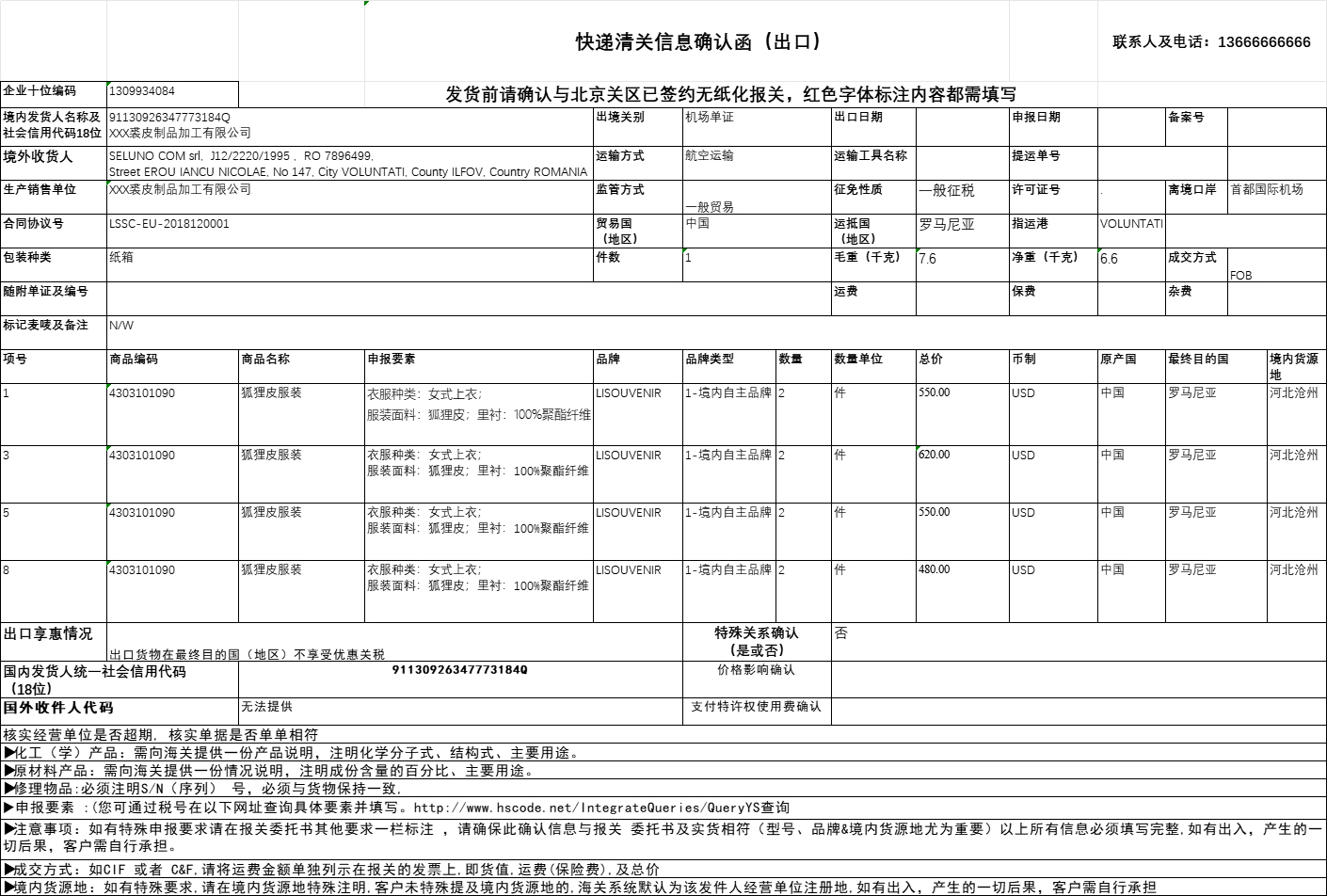
In practice three parties share this form: the shipper fills it in, the courier or broker keys it into the declaration system, and customs reviews it on that basis. The header reads 'Courier Customs Clearance Information Confirmation (Export)'. In essence it is a written confirmation of export declaration data — signing it means you accept everything on the page.
The form has four blocks, matching four judgments customs makes. Company details answer 'who is shipping'. Cargo and transport answer 'how the goods move'. The commodity block answers 'what it is and what it is worth'. The three checkboxes answer 'how tax is calculated and whether there is compliance risk'. Blur any one block and you can trigger a manual review.
In 2026, courier-channel declaration data is largely system-to-system. The paper or PDF confirmation form exists for record-keeping and authorization. A salesperson saying 'declare it like last time' on WeChat carries far more risk than filling in the form, signing it and sending it back. Once your document templates are fixed, post them on your site alongside quotes and product specs — see foreign trade website building services for how to lay them out as standard sections.
Company details: don't swap the 10-digit company code and the 18-digit credit code
These are two different systems, and mixing them up is the most common cause of rejection. The '10-digit company code' is the customs registration number for importers and exporters — 10 digits. The 'domestic shipper name and unified social credit code' is the 18-digit code issued by the market regulator. Some people cut the last 10 digits off the 18-digit code and drop them into the code field; the broker's system throws an error the moment it is keyed in.
- Domestic shipper: must be the operating unit on the customs declaration. Write the full name on the business licence — no English name, brand name or abbreviation.
- Overseas consignee: the buyer on the contract, matching the bill of lading and commercial invoice. If a middleman is reselling, write the actual receiver, not the middleman.
- Domestic source location: the prefecture-level city where the goods are actually produced or purchased. This field gets cross-checked during export tax rebate verification.
- Contact: a mobile number someone will answer the same day. Inspections and amendments depend on reaching that person.
After a name change, relocation or capital increase, confirm the customs registration has been updated before you fill in this form. Send the confirmation back to the customer or forwarder from a company mailbox. Inboxes get crowded — use foreign trade email management software to keep customs, forwarder and customer mail in separate streams.
Cargo and transport: how to fill the departure customs district, gross and net weight
'Departure customs district' takes the customs district name or district code, not the port name. Shipping via Shenzhen does not mean writing 'Shenzhen' — name the specific district. 'Mode of transport' should reflect reality: courier, air or sea. Don't default to courier just because a courier company is involved. 'Conveyance name' takes the flight number or vessel and voyage; on courier channels the broker can fill it in.
Packaging type, number of packages, gross weight and net weight come from the packing list and nothing else. Gross weight includes outer cartons and pallets; net weight does not. If the gap between them looks absurd, the system flags an exception and sends the shipment for inspection. For a multi-carton shipment, write the total carton count — never 'several'.
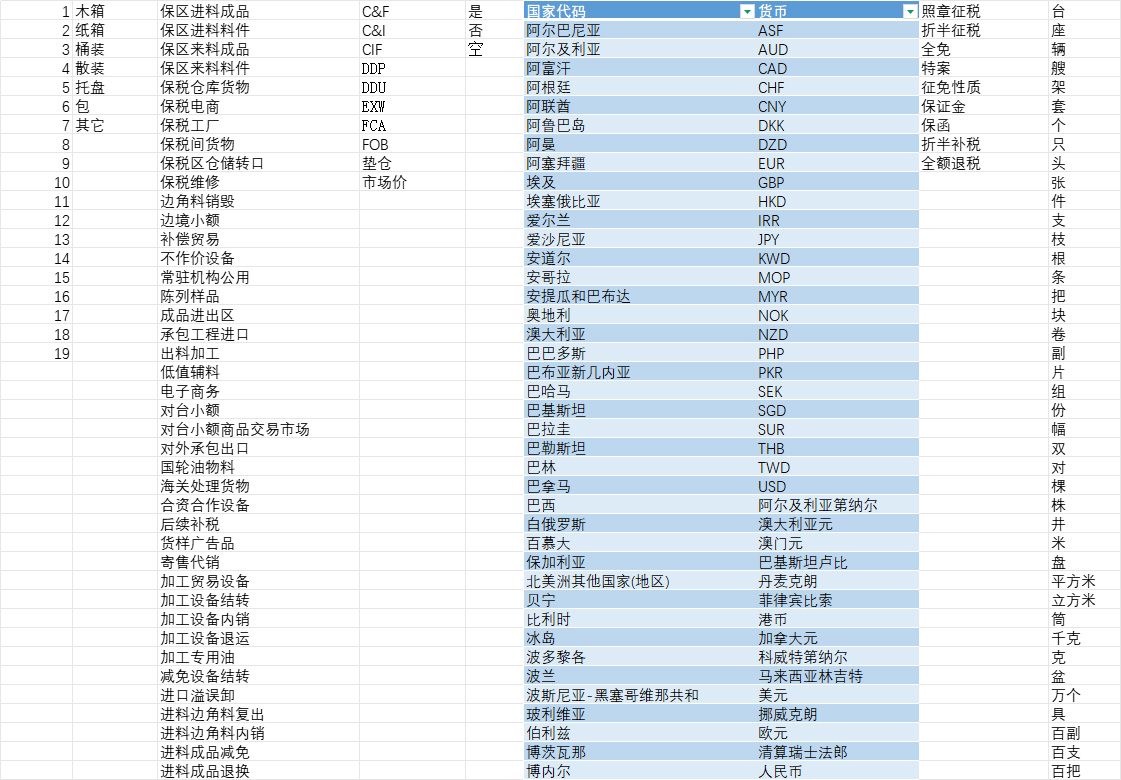
Incoterms decide what goes into the declared value. Under FOB, freight and insurance are the buyer's cost and are not added to the declared value. CIF includes them. EXW is ex-works, with onward costs on the buyer. The same customer can use different terms on different orders, so don't copy the last shipment.
Commodity block: product code, declaration elements and total value/currency are the easiest to get wrong
The product code is a 10-digit HS code. The first six digits are internationally standard; the last four are China subheadings. Those last four determine regulatory conditions and the export rebate rate. A wrong code means more than a correction — your rebate claim can fail. If you are unsure, ask the factory for the declaration code and confirm it once with the broker.
Declaration elements follow the prescribed declaration catalogue for that code, item by item. A product name alone is not enough. Brand type is a four-way choice: no brand, domestic own brand, foreign brand (OEM production), foreign brand (other). Leave it blank and the system rejects the entry.
Total value and currency must match the commercial invoice exactly, and quantity units must use legal units of measurement. The table below covers six fields where mistakes cluster.
| Field | Common mistake | Correct approach |
|---|---|---|
| 10-digit company code | Last 10 digits of the credit code | The 10-digit code from customs shipper registration |
| Domestic shipper | Abbreviation or English name | Full business licence name, matching the operating unit on the declaration |
| Departure customs district | Port city name | Customs district name or district code |
| Gross / net weight | Same number in both fields | Gross includes packaging, net does not — split them per the packing list |
| Brand type | Left blank or ticked at random | Tick one of the four options per reality; OEM picks the matching one |
| Total value / currency | Doesn't match invoice amount or currency | Check digit by digit against the commercial invoice; if the price changes, change the invoice |
The three confirmation checkboxes: preferential treatment, special relationship, royalties
'Export preferential treatment' asks whether the shipment enjoys a preferential rate under a free trade agreement or similar. Tick 'yes' and you need a certificate of origin to back it up; ticking yes without a certificate makes later verification painful. If you are not sure, tick 'no'. Don't tick for appearance's sake.
'Special relationship' asks whether buyer and seller are related. Parent and subsidiary, common control, cross-shareholding all count. If it exists, declare 'yes'. Declaring honestly is not a problem; hiding it is. 'Price influence' then asks whether that relationship affected the transaction price.
'Royalty payment' asks whether the buyer pays separately for trademarks, patents or know-how tied to these goods. If yes, tick 'yes' and state the amount; if no, tick 'no'. Log these checkboxes together with each shipment's code and value in your customer follow-up Excel sheet. Next time you handle the same product you can pull the record instead of asking the factory again.
Run this five-step self-check before you submit:
- Check the full business licence name, the 18-digit credit code and the 10-digit registration code, one by one.
- Make the invoice amount, currency and incoterm agree with each other.
- Match carton count, gross weight and net weight against the packing list.
- Match the product code and declaration elements to the factory's documents, and make sure brand type is ticked.
- Complete all three confirmation boxes per the real transaction, sign and stamp, then name the scan 'contract number + date' before sending it back.
FAQ
Is the export customs declaration confirmation form the same as the customs declaration?
No. The confirmation form is the shipper's source information and authorization to the courier or broker. The customs declaration is the official document the broker generates after keying that data into the customs system. Get the confirmation form wrong and the declaration is definitely wrong. Get it right and you still need to check the generated declaration before signing.
Can I export with this form if I have no import-export licence?
Not in your own name. The usual route is to use an agent that holds a licence as the operating unit, or to go through market procurement or cross-border e-commerce channels. In that case 'domestic shipper' is the agent, and the actual consignor's details go in the attached documents. If you are in foreign trade for the long run, build a B2B foreign trade website with your entity documents in place — it also makes factory and qualification checks easier for customers.
FOB or CIF — what does the incoterm actually affect?
It affects what makes up the declared value and who owns freight and insurance. Under FOB, freight and insurance are not included in the declared value; under CIF they are. If the value basis does not match the invoice, customs will ask for an explanation, and in serious cases you amend and re-declare — the shipment will not leave that day.
If the goods get inspected after the form is signed, who is liable?
Inspection itself is routine. If the information is true and the goods match the documents, inspection costs follow your agreement with the courier or broker. If a wrong confirmation form led to a false declaration, the shipper is liable — penalties and port storage charges are on you.