

A full set of export customs paperwork means five documents — and one Excel file can generate them all: the export goods detail sheet, commercial invoice, packing list, customs declaration and declaration elements sheet. You type the product name, quantity, amount, gross and net weight once on the “Detail Input” tab, and every other sheet pulls the data automatically. In 2026, customs checks document consistency more closely than ever. Copying the same shipment by hand four times carries far more error risk than one linked file.
Which documents do you actually need for export customs clearance?
For a standard export shipment, your broker does not want a single invoice — they want a set. What sales sends over usually includes the export goods detail sheet, commercial invoice, packing list and customs declaration, plus the declaration elements sheet the broker uses for classification. Miss one and the broker comes back to you for it, which hurts most when the vessel cutoff is close.
The five documents serve different purposes but share one data source. Product name, quantity, unit price, gross and net weight must match exactly across all five, because customs compares the logic between them, not each one in isolation.
| Document | Main purpose | Usually prepared by | Common errors |
|---|---|---|---|
| Export goods detail sheet | Internal data source; consolidates product name, quantity, amount, HS code | Salesperson | Product name worded differently from the declaration |
| Commercial Invoice | Basis for customer clearance, payment and settlement | Salesperson / document clerk | Amount does not match contract or declared amount |
| Packing List | States number of packages, gross and net weight, volume | Merchandiser / warehouse | Gross and net weight reversed; package count differs from actual |
| Customs declaration | Legal document filed with customs | Broker / document clerk | Wrong HS code, terms of trade or currency |
| Declaration elements | Lets the broker check classification, price and origin | Salesperson | Brand, model or use left blank |
Look at this table and you will see that 70% of the fields repeat across the five documents: customer name and address, contract number, invoice number, product name, quantity, amount. That repetition is exactly why a template exists.
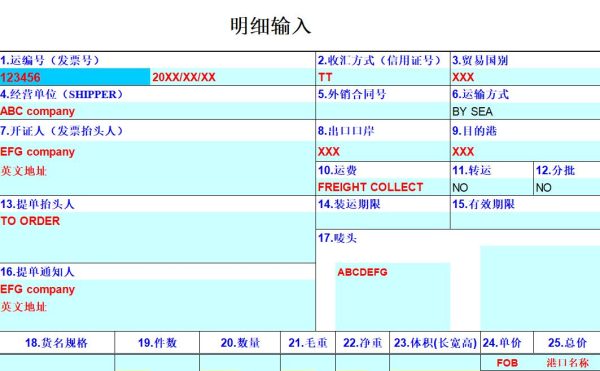
How does one Excel template generate five documents from a single sheet?
The logic is simple: the detail input sheet is the only data source, and the invoice, packing list, declaration and detail sheet pull values through cross-sheet references. Change a quantity once and all four documents update with it — no more “invoice changed, packing list forgotten”.
- Open the template and go only to the “Detail Input” sheet. Leave the other sheets alone for now.
- Enter the header fields from the contract and PI: contract number, invoice number, invoice date, customer name and address, terms of trade (FOB / CIF / EXW), currency, destination port.
- Enter the goods details: product name, model, HS code, quantity, unit price, total price — one line per specification.
- Add packing data: package count, package type, dimensions per package, gross weight, net weight, volume. The packing list is generated from these columns.
- Switch to the invoice, packing list, customs declaration and detail sheet tabs, check the auto-filled content one by one, then print or export to PDF.
In practice, a shipment with three specifications takes over 40 minutes of manual paperwork. With the template, input plus checking comes in under 10. The difference is not typing speed — it is how many times you check. To lock this process into your team, see how the foreign trade customer follow-up Excel sheet works: keep document archiving and order progress in one set of files.
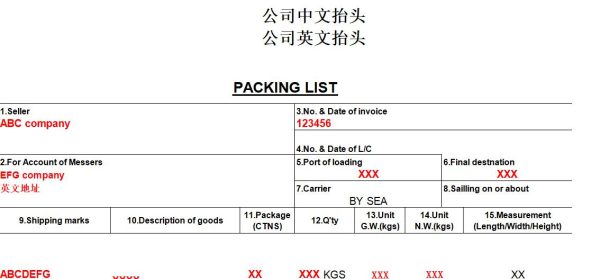
The four fields most often wrong on invoices and packing lists
When your customer clears customs, the destination authority checks whether the invoice and packing list match each other. Amount, package count, gross and net weight, product description — if any one conflicts, you face a document request at best, an inspection and port delay at worst, and the shipper pays.
- Amount and terms of trade: under CIF, state clearly whether freight and insurance are already included in the unit price. The invoice total and the declared total must use the same basis — not one with freight and one without.
- Gross and net weight: net weight is the goods themselves, gross weight includes packaging. Reverse them and the scanner weight will not match, which triggers an inspection.
- Package count and type: if you write “10 CTNS”, do not also write “10 PALLETS”. Pallets and cartons are two different things, and the count on the bill of lading must match the packing list.
- Product description: use the same wording in all three places — invoice, packing list and declaration. Do not write “LED Spotlight” in one and “lighting fixture” in another.
Making these fields mandatory with validation in the template is far less work than fixing them later. Compare the sample invoice and packing list above field by field.
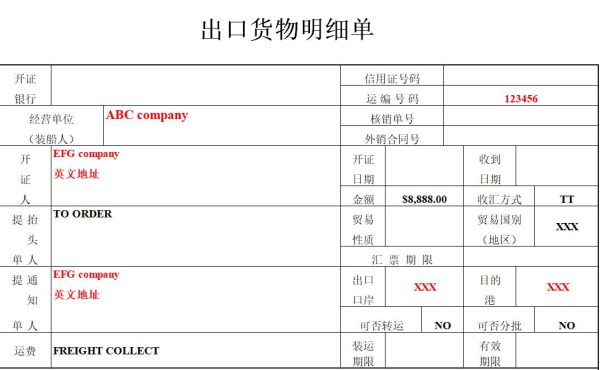
Which fields on the 2026 customs declaration need the closest attention?
The declaration is the fastest-changing of the five documents. For 2026 filings, check HS code, brand and model, terms of trade, currency, country of origin and domestic source location line by line. One wrong digit in the HS code usually means rejection and resubmission — and if it lands on the cutoff, you rebook for the next vessel.
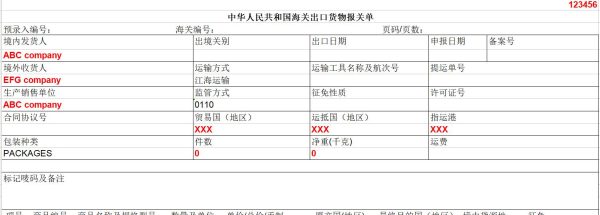
The declaration elements sheet is what your broker classifies from. Spell out brand, model, use, material and function, and you will avoid most classification disputes. Many rejections are not because the salesperson is unprofessional — it is because the “use” field was submitted with just two words: “accessory”.
Update the template whenever customs changes the filing format. The original notes that a “Foreign Trade Packing List Excel Template” launched in September 2025. Single-document templates like that suit cases where you are only missing one form. The full set runs six linked worksheets — detail input plus invoice, packing list, export goods detail sheet, customs declaration and declaration elements. Fill one, the rest generate automatically, and the print layout follows the official documents.
Once the documents are done, how do you cut back-and-forth revisions with customers?
One document error costs your customer a day at customs. The cost of amending is not on your side — it is on their broker and warehouse. Moving confirmation earlier beats apologizing later.
Send documents with a fixed email template and name attachments consistently as “invoice number + document type”, so the customer finds them instantly. With high volume and many customers, use foreign trade sales email management software to keep each shipment's invoice, packing list and bill of lading in one project folder — no scrolling through chat history when you need to check.
For customers who live in messaging apps, send the PDF directly and have them confirm package count, gross and net weight on the spot. Installers for desktop and mobile are explained on the official WhatsApp download page. Once the customer replies “confirmed”, you have it in writing.
If your customers place orders and check documents themselves, moving this process onto your website saves more labor. Start with the B2B foreign trade website solution, or compare website plans and pricing to judge which configuration is enough.
FAQ
Can I submit an export customs document template directly for declaration?
A template is a formatting tool, not a substitute for real data. You must fill in and verify every item against the contract, PI and actual shipment before handing it to the broker. A blank template submitted as-is will always be rejected.
Must the declaration amount match the commercial invoice amount?
Yes, and on the same basis. Under CIF, if the invoice includes freight and insurance, the declared total must be filed the same way. A mismatch triggers a request for explanation and slows clearance.
Can one template handle both air and sea freight documents?
Yes. The differences are mainly mode of transport, bill of lading or airway bill number, and port of loading and destination. Make those optional fields in the template; the body of the invoice and packing list stays the same.
Excel template or customs software — which is better?
For low volume and mostly general trade, an Excel template is enough: low cost, fast to change. For high volume, or when you need to connect with ERP or broker systems, consider software — and standardize your field definitions before you switch.