

Build your export quotation in Excel and you will move much faster than with PDFs or images: change one unit price and the totals, discounts, and freight recalculate automatically. The client can forward it to their purchasing manager without math errors. In 2026, every salesperson should still keep a standard Quotation.xls template with fixed fields and consistent definitions, so you do not have to explain the same quote over and over.
Why Stick With Excel for Export Quotations Instead of PDF or Images?
Once a PDF or image is sent, the client has to recalculate everything if they want to change the quantity. One mistake and you spend half an hour checking numbers with them. Excel removes that step: when the client changes Quantity from 1,000 to 3,000, tiered pricing, total value, volume, and weight update on the spot. That can save a full day in response time.
There is also a practical reason: a quotation is an internal document for the client. They need it to get approval from their boss, compare you with two other suppliers, and check payment terms with finance. An editable spreadsheet can be copied into their comparison sheet; an image can only be screenshotted.
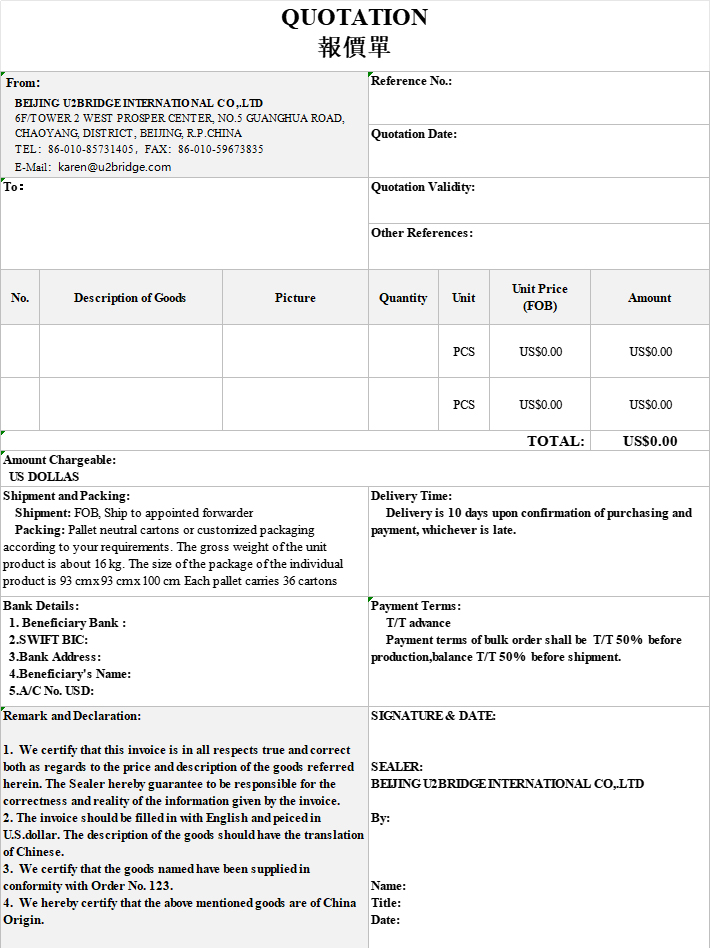
How to get it is unchanged: Add the technical WeChat ID 781888709 to get the export quotation Quotation.xls template. We send it instantly on business days. Do not use it as-is. First update the letterhead, payment terms, and the Incoterms you quote most often to match your company, then send it to your first client.
How to Fill the 8 Fields in Quotation.xls (Reference Table)
A template is only as good as its field design. Too few fields and the client keeps asking questions; too many and the salesperson spends half an hour on every quote. These 8 fields are essential in an export quotation. Miss one and you are more likely to argue about it later.
| Field | Example | Why the Client Cares |
|---|---|---|
| From / Letterhead | Full company name, address, phone, business email | Shows whether you are a factory or a trader |
| Quotation No. and Date | QT-20260415-01, valid for 30 days | Gives a clear reference for reconciliation and price comparison later |
| Description of Goods | Product name, material, size, model, HS code | Avoids disputes when products look the same but use different materials |
| Quantity | 1,000 pcs, with MOQ and tiered pricing noted | Quantity determines the price tier |
| Unit Price | USD 2.35/pc FOB Ningbo | An unclear price term is not a real quote |
| Shipment and Packing | Carton 40×30×30 cm, 1,200 cartons per 20GP | They need to calculate total cost and warehousing |
| Delivery Time | 25 days after deposit | Determines whether they can catch the selling season |
| Payment Terms | 30% T/T deposit, 70% against copy of B/L | How they will manage cash flow |
One detail matters when filling the form: always put the Incoterm and port after the unit price, as in USD 2.35/pc FOB Ningbo, not just USD 2.35. Different terms can change the price of the same product by more than 10%, and a vague quote will eventually turn into an email argument.
Validity matters too. Raw material and freight costs move, so set Validity at 15 or 30 days and reconfirm after that date. This protects you and reminds the client when they need to make a decision.
In 2026, Clients Ask AI Before They Ask You: What to Prepare Beyond the Quote
At Google I/O 2026 (May), Google said AI Mode had about 1 billion monthly active users, and AI Overviews answer informational queries directly at the top of the page. Pew Research found that when an AI summary appears, about 8% of users click traditional results; without a summary, about 15% do. Before a client receives your quotation, chances are AI has already helped them shortlist suppliers.
Ahrefs research from March 2026 is even more telling: among URLs cited in AI Overviews, only 37.9% also appeared in the top 10 organic results for that query (it was about 76% in July 2025), and another 31% ranked outside the top 100. The ranking logic has not changed; the results page has. AI simply summarizes pages that already rank. Google has also stated clearly that AI Overviews do not require extra structured data: good SEO is good GEO.
In a quotation context, when the client searches your company name, whether they can find these three things decides whether they trust your quote:
- Product pages with a spec table and MOQ, with parameters that match the quotation
- A first screen that says who you are and what category you make within 3 seconds—on mobile, about 53% of users leave if loading takes more than 3 seconds
- An inquiry form with only three fields: name, email, and requirements. The more fields, the more leads you lose
Site performance matters too. Keep LCP under 2.5 seconds, INP under 200 ms, and CLS below 0.1; set fixed width and height for images, and delay third-party analytics and chat scripts until the user's first interaction. This is technical work. If it is over your head, hire someone, use the B2B export website page structure as a reference, and check the website package and price comparison for budget ranges.
Five Common Reasons Your Quote Gets No Reply
- You sent only a price, not the terms. The client cannot see FOB or CIF, or the delivery time, so they cannot check the cost further.
- No tiered pricing. They want 500 pieces, but you quoted only for 5,000, so it looks expensive and you are out.
- You sent it from a free personal email. It is more likely to land in spam, and the client will not remember who you are.
- The attachment is just named Quotation.xls. They get 20 quotes a day; who will remember that? Rename it Company-Product-Date.
- You send it and wait. The average reply rate for B2B cold email is about 1%–5%; a targeted list with short copy can reach 8%–15%, but only if you send a follow-up on day three.
You cannot keep follow-ups in your head. Use the export sales client follow-up Excel sheet to record the date, version, and client feedback for every quote. On the second follow-up, you can say “the USD 2.35 version I sent last time,” and you will instantly sound more professional.
Your sending mailbox deserves its own system, too. Email management software for export salespeople can sort different clients into different folders, with quotes, PIs, and bills of lading in their own places, so you do not spend half an hour searching.
Change These 4 Things Before You Send the Template to a Client
Templates downloaded online use generic wording by default, and sending one as-is can easily make you look amateur. Change these 4 things and you can save yourself a pile of follow-up questions.
- Replace the letterhead with your full company name, business email, and a website link with SSL—Chrome marks sites without SSL as “Not secure,” which directly hurts inquiries
- Change the Incoterm to the one you quote most often. Do not mix FOB, CIF, and EXW
- Change payment terms to the proportions your company can actually accept. Do not copy “100% T/T in advance” from the template
- Add a line for exchange rate and validity, and state the quote base date clearly
If your website is still the one you built years ago—pages will not open, mobile layout is a mess, product pages have no spec table—even a beautiful quote cannot hold up trust. If you want to update the site at the same time, check the scope of website building services before you decide.
FAQ
Do export quotations always have to use FOB?
Not necessarily; it depends on which part you handle. If the client arranges ocean freight, quote FOB. If they want you to deliver to the destination port, quote CIF. For inland clients or sample orders, EXW is common. The key is to write the full term and port on the quote so the client can see at a glance how far the cost covers.
Where can I get the Quotation.xls template?
Add the technical WeChat ID 781888709, and we will send it instantly on business days. After you receive it, update the letterhead, payment terms, and common Incoterms to match your company, then save it as your standard company version. Do not rebuild it for every client.
How long should a quotation be valid?
15 to 30 days is common. For categories with big swings in raw materials, exchange rates, or ocean freight, use 15 days; for stable prices, use 30 days. Reconfirm after expiry—clients will actually see that you work with clear boundaries.
Can I just send the client a screenshot of the quotation?
For a quick reply, yes; for a formal quote, no. An image cannot change quantities, cannot be copied into the client's comparison sheet, and is not easy to forward for internal approval. If you really need to send an image, attach an Excel or PDF version as well.