

How Should You Set Up GA4? The Short Answer First
Short answer: to get decision-ready data for an export site, GA4 only needs four steps — create the account and data stream, add a filtered view, exclude your own company IP, and install the tracking code and verify it with the real-time report. One person can finish the whole thing in 30 minutes.
Plenty of owners install the code and never open the dashboard again. The tool isn't the problem — the structure was broken at setup: all traffic sits in one view, so sales staff clicking the site every day, competitor crawlers and domestic colleagues all count as "visitors." Once the data is dirty, every judgment after that is wrong.
This article follows the actual order of operations, from zero to readable numbers. Installing analytics is only the starting point; what really decides inquiries is the site structure itself. If you don't even have baseline traffic, start with why your export site has no traffic or inquiries.
What Business Questions Can GA4 Answer for an Export Business?
GA4 is not a counter that tells you "how many people came." It answers: which pages bring inquiries, which countries' visitors stay longest, which channel's visitors are most willing to fill in the form.
List these questions clearly and you'll know which reports to check:
- How many people visit the site, and how many of them are new
- Which product pages and industry pages get the most traffic
- Which countries visitors come from, and what share key markets make up
- How many conversions come from organic search, backlinks, ads and email
- What devices visitors use, and how high the mobile share is
- How often visitors come back, and whether there is sustained interest
Against this checklist, you'll see GA4's value is linking "inquiry" to "source." Form submits, email clicks and WhatsApp button clicks can all be set as conversion events, feeding back which channel deserves more budget.
Account, Property, Data Stream: How to Split GA4's Three Layers
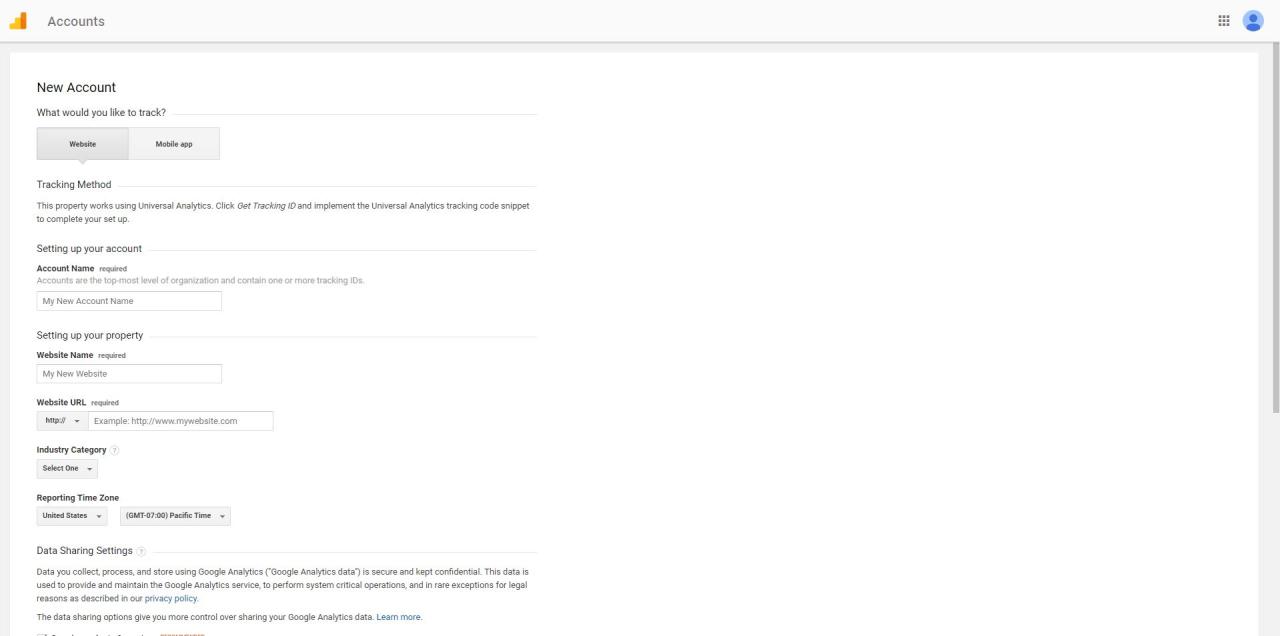
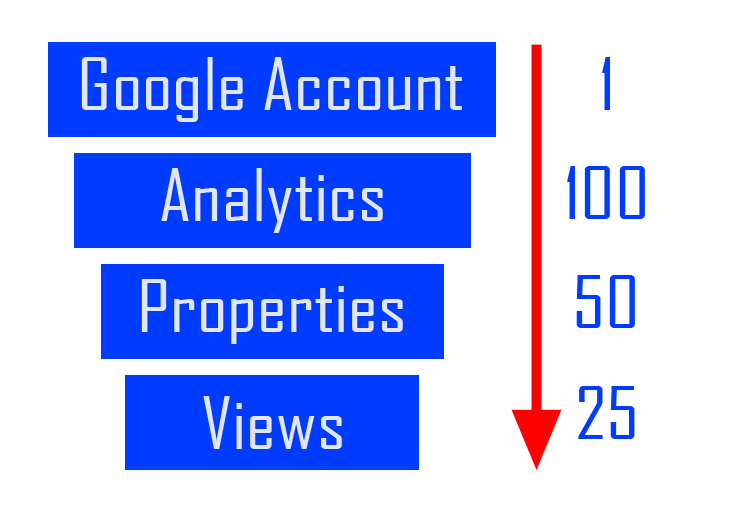
GA4 is structured differently from the old Universal Analytics. Get the hierarchy straight before you start and you won't have to redo it later. One Google login can hold multiple "accounts" (each matching a company or business line), each account holds "properties" (each matching one website), and each property holds "data streams" (each matching an actual URL).
| Layer | What it maps to | What to enter for an export site |
|---|---|---|
| Account | Company or business group | Full company name; separate accounts for multiple brands |
| Property | One standalone site | Main domain; set the time zone to your key customer market |
| Data Stream | Website or app | Choose "Web" and enter the full https URL |
| View / Reports | Where you read data | Keep the default raw view, add a filtered view |
The time zone is the most overlooked item. If your customers are mainly in Europe and North America, set the time zone to the target market. Otherwise the "today's data" you see won't line up with your sales team's hours, and campaign reviews will be off by a day.
Pick the industry category that matches your actual business. Machinery, chemicals and consumer electronics each have their own category. A wrong pick only affects some default reports, not core data, so don't overthink it.
Why Do You Need a Filtered View and a Sandbox View?
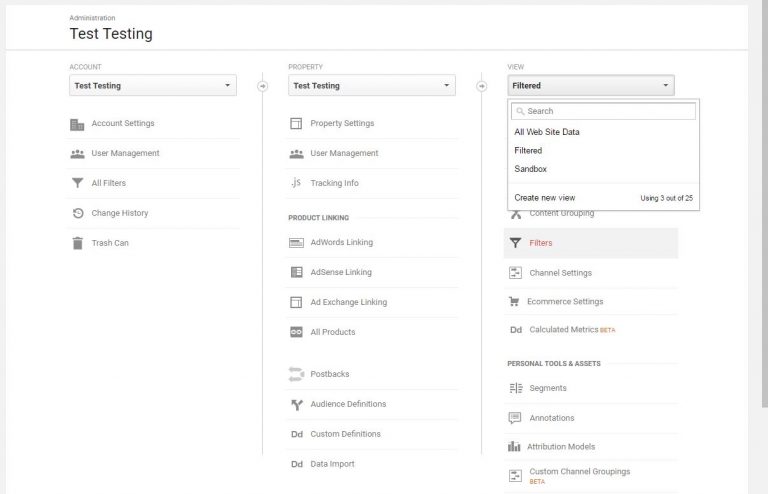
GA4 creates a default view containing all raw data. Leave that one alone as a reference. Build two more:
- Filtered view: excludes company IPs, internal staff and common spam sources
- Sandbox view: test new filters and events here first so you don't pollute live data
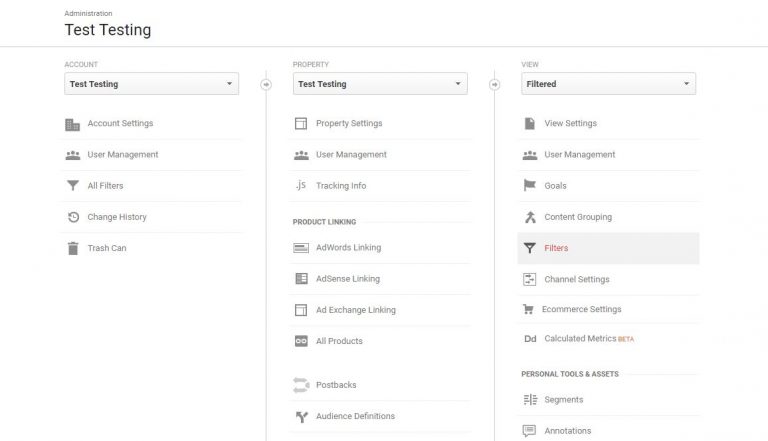
How to build them: Admin → Data streams and views → Create view, name them Filtered and Sandbox, then set Filtered as your default view.
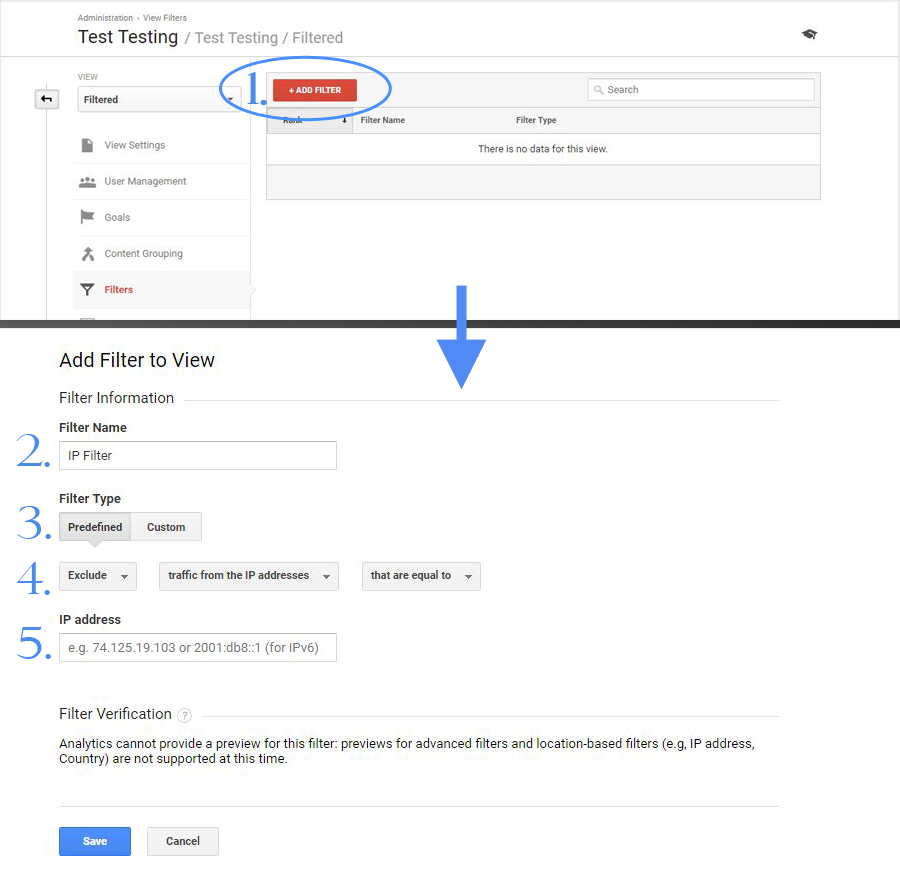
Excluding your company IP is the highest-return step. Path: Admin → Data filters → Create filter → Exclude → IP address equals → enter your company's public IP. If you don't know it, search "what is my IP" in a search engine. Sales staff click their own product pages every day at the office. Without exclusion, your top product pages are pure self-generated traffic.
If a flood of odd sources starts showing up, such as Russian link networks or gambling keywords, it's usually referral spam. Handle it the way you'd handle spam inquiries and spam comments on WordPress: isolate first, block second, and never edit the main view directly.
How Do You Install the GA4 Tracking Code on Your Site?
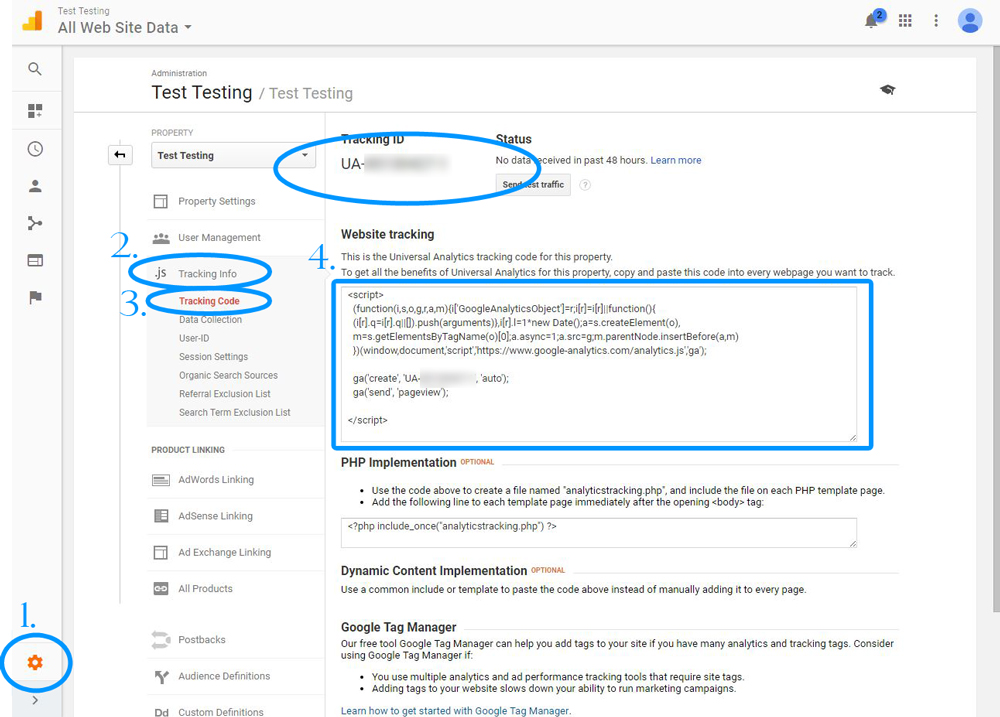
The code has to appear on every page, or the data will break. The install method depends on what you build with:
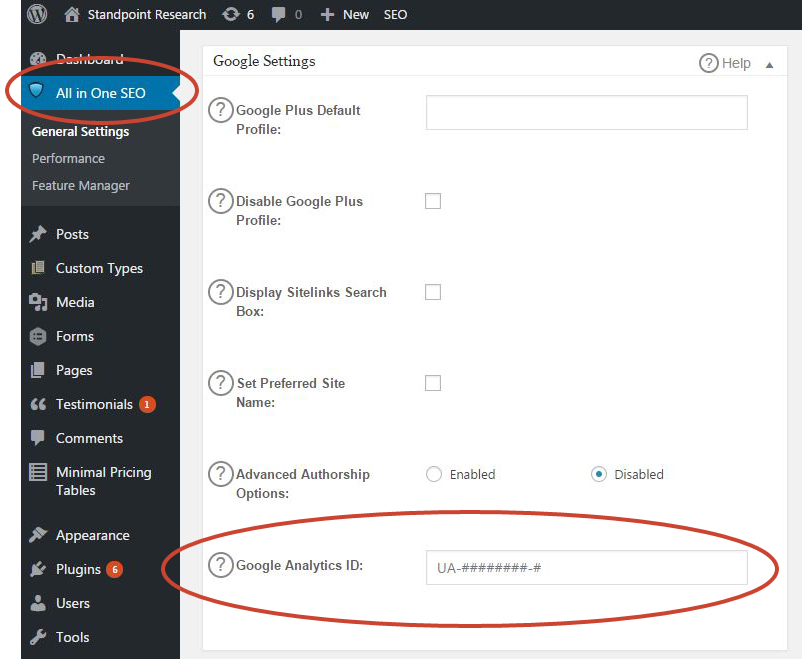
- WordPress: use All in One SEO or a GA4 plugin and paste your measurement ID (starts with G-) in the plugin settings — no code editing
- Shopify / standalone store: paste the measurement ID under Customer events or Preferences in the admin
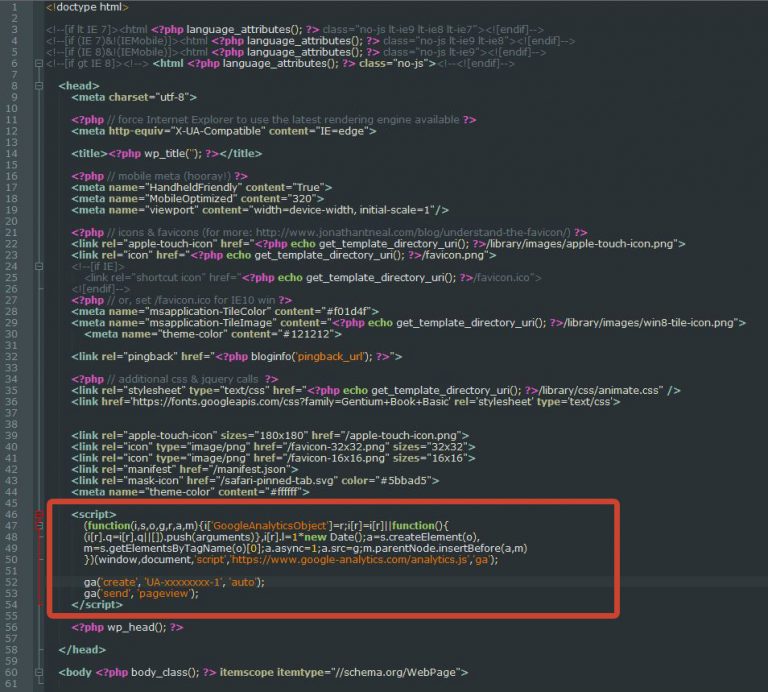
- Static site or FTP: paste the full script into the site-wide
- Site builder platforms: have the provider add it at template level instead of pasting page by page
Here's a speed trap: the GA4 script is third-party code and a common cause of slow INP (interaction response). The 2026 Core Web Vitals standard is INP ≤ 200ms, so delay GA4 and other pixels until the user's first interaction (touchstart, mousemove, scroll). On mobile, about 53% of users leave if a page takes more than 3 seconds. Analytics code shouldn't be the reason your first screen drags.
If your site isn't live yet or you just changed servers, confirm the site is reachable before installing code. For migration steps, see migrating WordPress to another hosting provider. To build a healthier traffic mix with steady organic search entry points, see the ultimate guide to English backlinks for exporters.
How Do You Verify the Code Is Really Tracking Visitors?
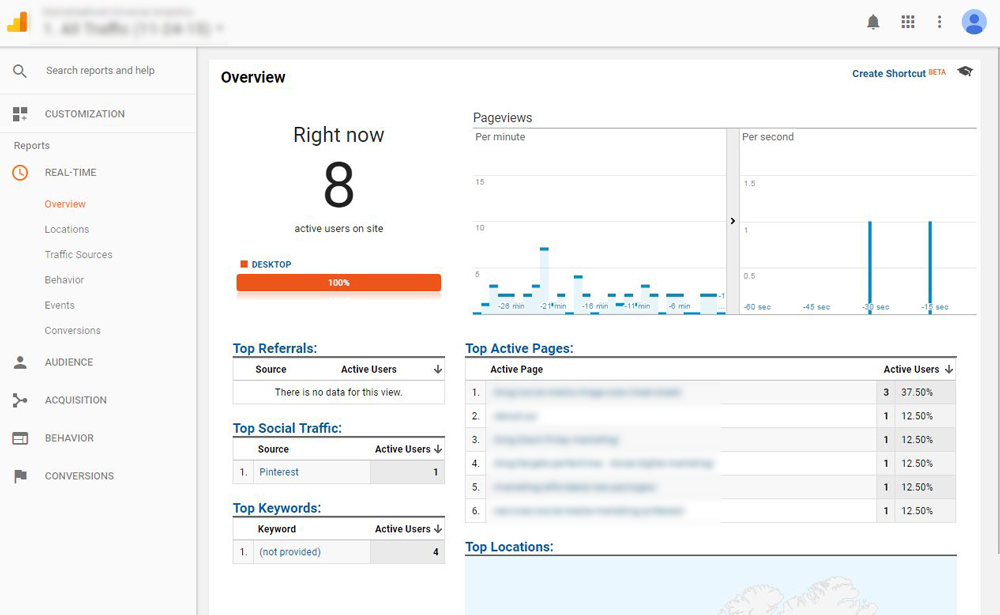
Don't install it and wait for tomorrow's report. Verify on the spot with the real-time report: open your site on mobile data, go to Reports → Realtime in GA4, and check that 1 active user appears, with the correct source and page title.
No data? Work through this order:
- Check whether the browser has an ad blocker — blockers stop GA4 requests outright
- Check that the measurement ID is correct; the G- string can't be missing a character
- Confirm the code is inside
- Use the browser's network panel to see whether the collect request fires
- Check whether a cookie consent tool is blocking analytics scripts by default
Once data flows, compare Search Console queries and landing pages against it. That's how you spot pages with impressions but no inquiries. The method is the same as analyzing competitor websites: look at structure first, then at the gap.
In 2026, AI overviews dominate the top of Google's results. Pew Research testing found clicks through to traditional results run at about 8% when an AI summary is present, versus about 15% when it isn't. That means traffic concentrates on fewer pages. GA4 landing page data helps you judge which pages deserve more content and internal links. If the foundation is shaky, slow to load or the conversion path is messy, see how to structure a B2B export website.
What Should You Do After GA4 Is Installed?
Analytics is a dashboard, not an engine. After setup, push on three things: set form submits, email clicks and WhatsApp clicks as conversion events; review the source report once a week and cut channels that burn budget without inquiries; compare landing page data monthly and rewrite the first screen of pages that get impressions but no conversions.
Industry benchmarks put the cost of winning a new customer at about 5x the cost of keeping an existing one. So don't ignore the "returning users" column in GA4. Repeat traffic from the countries where your existing customers sit is often worth more than traffic from new markets. If email converts poorly, check deliverability first; tool usage is covered in using Google Postmaster to improve email deliverability.
One last note: GA4 data doesn't bring inquiries by itself. It just helps you avoid wrong turns. Clean setup, clear goals, one monthly review — that's enough.
FAQ
Is the free GA4 version enough for an export site?
For the vast majority of export sites, yes. It covers a few thousand to a few tens of thousands of visits a day. Only large teams needing very long data retention, deep cross-device analysis or multi-site rollups should consider the paid version.
How many websites can one Google account manage?
You can create multiple accounts, each with multiple properties, each property with data streams. Split it as two layers: company, then site. Multiple brands and multilingual sites should each get their own property so data doesn't contaminate itself.
Why does Realtime show data while historical reports are empty?
Usually the code is only on some pages, or the view is pointed at the wrong data stream. Filters may also be excluding the traffic. Switch back to the raw view to compare, then check code coverage.
What if the site got slower after installing GA4?
Load GA4 and other third-party scripts after the user's first interaction, set fixed width and height on images to avoid layout shift, and add fetchpriority="high" to the hero image. After the changes, Core Web Vitals takes about 4 weeks to show up in Search Console.