

Changing your A record in GoDaddy takes three steps: sign in and open My Products → find your domain and click DNS → change the A record named @ to your new server IP, then set the CNAME named www to @ and save. Most regions go live within 1–2 hours, 24 hours at the outside. Every step and every trap is below.
Only two records in GoDaddy actually need changing
Open the DNS management page in GoDaddy and you'll see a dozen or so records: A, CNAME, MX, TXT, NS. When you move to a new host, only two of them affect how your site loads. The rest mostly serve business email and domain verification — leave them all alone.
| Record type | Host (Name) | Value | TTL | Purpose |
|---|---|---|---|---|
| A | @ | New server IP, e.g. 12.34.56.89 | 600 seconds | Points the root domain to the server hosting your site |
| CNAME | www | @ | 600 seconds | Makes the www version open the same site as the root domain |
| A / CNAME | Other subdomains | Leave as is | — | Like blog, shop — don't touch unless you need to |
| MX / TXT | @ | Leave as is | — | Business email delivery and SPF/DKIM validation. Delete them and mail stops the same day |
The IP in the table is just an example. Your real IP comes from your web developer or host, in the four-block dotted format. One wrong digit and the site won't open, so copy and paste instead of typing it out.
Filling @ into the CNAME row means "the www version follows the same path as the root domain". A customer who types www.yourdomain.com and one who types yourdomain.com land on the same site — no case where one opens and the other 404s.
Three checks before you start that save half the rework
Editing DNS isn't scary. What's scary is getting halfway and finding you don't have access, or that the server never accepted your domain in the first place.
- New server IP: Ask your web developer for it, and confirm they've already bound your domain on the server. If it isn't bound, the DNS resolves to a blank page or a 404.
- Control of the domain: Whose name is the domain in, and who holds the GoDaddy login. A common situation at trading companies: the domain was registered by a third party years ago, and nobody can get in on launch day.
- Screenshot of the old records: Capture the full DNS page before you touch anything. If you make a mistake you can match it back line by line — MX records especially.
Check SSL while you're at it. Sites without SSL get a "Not secure" warning in the Chrome address bar, and most buyers close the tab at that point. Server environment, SSL and 301 redirects for a new site should normally be handled as part of website build delivery.
Step by step: the full GoDaddy A record process
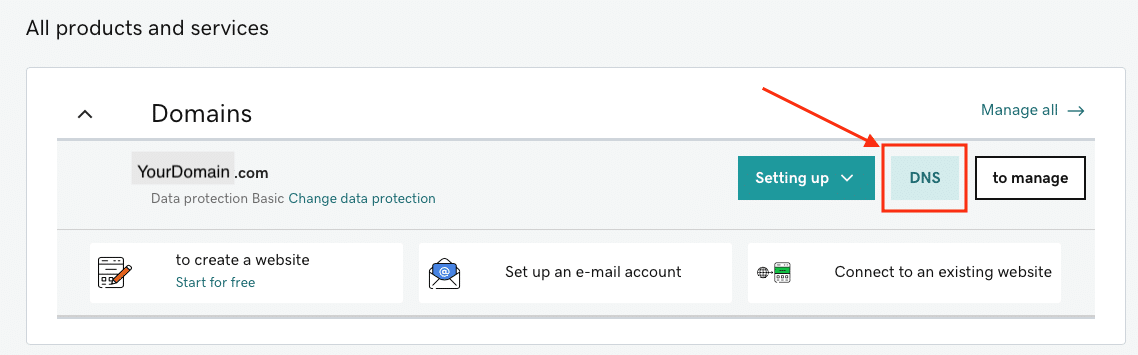
- Sign in to GoDaddy: Hover over your account name in the top right and click My Products.
- Find the domain: The product list shows every domain you own. Scroll to the target domain and click DNS beside it.
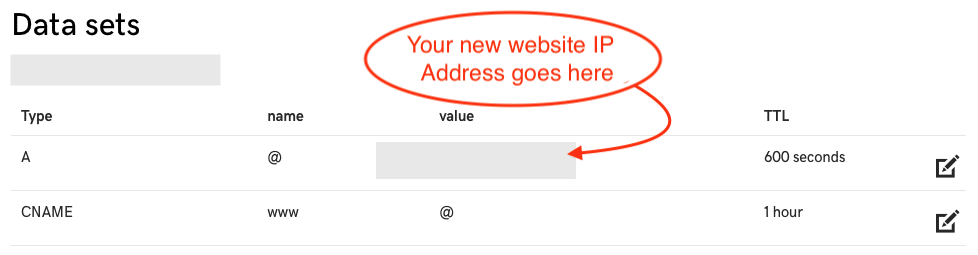
- Edit the A record: Find the row with type A and name @, click edit, change the value to the new IP, and set TTL to 600 seconds (10 minutes).
- Edit the CNAME: Find the row with type CNAME and name www, set the value to @, TTL 600 seconds again.
- Save and verify: GoDaddy usually writes instantly and refreshes the new value on screen. Reload once to confirm the numbers didn't revert.
- Tell your developer: Have them bind the domain on the server, issue the SSL certificate and set the http-to-https redirect.
If you're changing an established site that already has traffic, drop the TTL from 3600 to 600 first. Wait a day for the old TTL to expire, then change the IP — that pulls the switchover window down to ten-minute scale.
Site not opening after the change? Work through this order
- Clear the local cache first: On Windows run ipconfig /flushdns in the command line; on Mac run sudo dscacheutil -flushcache. Then open the site in an incognito window.
- Check global propagation: Use a third-party DNS checker to query nodes in several regions. If some nodes still return the old IP, it's still propagating — just wait.
- Confirm the domain isn't proxied: If DNS is hosted on Cloudflare and the A record has the orange cloud switched on, the real IP is hidden and you have to trace back to origin.
- Check the server side: Is the domain added in the hosting panel, does the site directory point to the right place, and does the SSL cover both the www and non-www versions.
- Make sure you didn't change NS: Some people switch nameservers to another provider. Then the A record has to be edited at the new DNS provider — nothing you do on the GoDaddy page will take effect.
One more thing: changing servers isn't only a DNS edit. A full site move also involves exporting the database, transferring files and rewriting permalinks. Follow the process in moving a WordPress site to another host.
How long DNS takes: real-world timing in 2026
"Site propagation" sounds mysterious, but it's simply the time recursive DNS servers worldwide take to swap cached old records for new ones. With TTL at 600 seconds, in theory a new round happens every 10 minutes.
In practice, most users see the new site within 1–2 hours. A few regions or carriers may take up to a day because of their own caching policy. That timing has nothing to do with how good your site is — it's purely caching.
The worst thing you can do is keep editing during propagation. Some people refresh every half hour and switch the IP back the moment it won't open, so two IPs point back and forth and search engines crawl an unstable state. Make the change, then wait — at least until the next day before you judge it.
Resolution is only the start: three things between a new site and inquiries
A correct domain record only means "the site opens". Getting inquiries follows different logic. In 2026, an overseas buyer decides whether to send an email within seconds of landing on your site.
- Say who you are and what you solve in the first 3 seconds: Skip "Welcome to our company" next to a photo of the factory gate. Buyers want products, specs, capacity, certifications.
- Mobile speed: Google's data shows about 53% of users leave if a mobile page takes more than 3 seconds to load. The 2026 passing line is LCP ≤ 2.5s, INP ≤ 200ms, CLS ≤ 0.1 — and changes take about 4 weeks to show up in Search Console.
- Product pages and forms: Product pages need a spec table and MOQ. Inquiry forms should have as few fields as possible — name, email and requirement convert best.
Plenty of foreign-trade sites resolve fine and look good but still get no inquiries, and the cause is usually one of the points above. For a systematic breakdown, read why your independent foreign-trade site gets no traffic or inquiries — a self-check costs far less than blind ad spend.
After launch, open your competitors' sites one by one: what they put in the first screen, how many specs their product pages list, how many fields their form asks for. Using competitor analysis to improve your own site has the full checklist. One round of that beats guessing at demand.
FAQ
Does GoDaddy charge for changing an A record?
No. If the domain is registered with GoDaddy, DNS management is a free feature — A, CNAME, MX and TTL edits cost nothing extra. What you pay for is domain renewal and add-ons like SSL certificates.
What's the difference between an A record and a CNAME record?
An A record points to an IP address and is used on the root domain. A CNAME points to another domain name and is typically used on subdomains like www. Change the A record and the root domain follows; change the www CNAME and only www traffic follows. Change both and customers get in either way they type it.
Will changing the A record affect company email?
Changing only the type A @ record and the type CNAME www record won't affect email. Email depends on MX records plus SPF and DKIM validation in TXT. But if you accidentally delete MX or TXT, mail breaks immediately — so take that screenshot before you start.
If the site moves to a new server, does the A record need changing again?
Yes. An A record exists to point a domain at a specific server, so when the server IP changes the record has to be updated with it. Drop the TTL to 600 seconds before the move and customers will barely notice the switch.