

Bottom line first: in 2026, an XML sitemap is still the lowest-cost move that helps Google discover new pages on your export site. It will not earn you rankings. It only answers whether a page can be crawled and indexed. It does not answer whether that page deserves to rank. Spend 30 minutes generating it, submitting it, and checking index counts in Search Console. Then put the rest of your time into product pages and content.
XML sitemap vs. HTML sitemap: which one does an export site need?
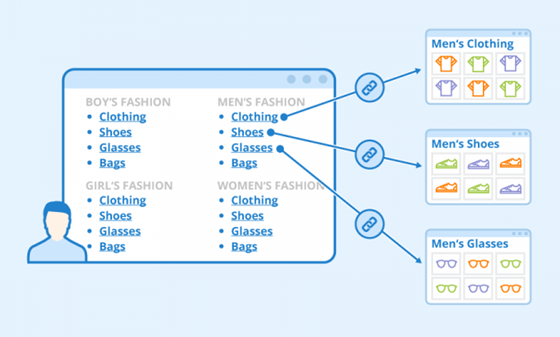
The two names look similar, but their jobs are completely different. An XML sitemap is a URL list built for crawlers; visitors almost never see it. An HTML sitemap is a directory page built for visitors, usually placed in the footer. For an export site, the XML sitemap is a must; the HTML one depends on your setup.
| Item | XML sitemap | HTML sitemap |
|---|---|---|
| Who it is for | Search engine crawlers | Real visitors |
| Typical location | /sitemap.xml, invisible to visitors | Footer or a dedicated directory page |
| What it contains | URLs, last modified date, change frequency, priority | Categories, page titles, clickable links |
| Effect on indexing | Direct: you hand URLs to crawlers | Indirect: it helps crawlers follow internal links |
| Needed for an export site? | Must have | Optional; recommended for sites with many SKUs |
For B2B sites with 30 to 300 products, an XML sitemap is basic infrastructure and an HTML sitemap is take-it-or-leave-it. For stores with thousands of SKUs, do both: XML feeds crawlers, HTML helps visitors reach the target category in three clicks. If you have not decided which kind of site to build yet, start with the B2B export website options.
Does AI search still need an XML sitemap in 2026?
Yes, but it is not an “AI-only file.” Google was explicit in 2026: getting pages into AI Overviews and AI Mode does not require extra structured data, special files or a Markdown version. Good SEO is good GEO. The sitemap's job has not changed: help crawlers find pages, help pages get indexed.
What changed is the shape of the results page. Pew Research testing in 2026 found users clicked traditional results about 8% of the time when an AI summary appeared, versus about 15% when it did not. An Ahrefs study from March 2026 is more direct: only 37.9% of URLs cited in AI Overviews also appeared in the top 10 organic results for that query, and another 31% ranked outside the top 100. AI pulls content from deeper pages, provided those pages get crawled and indexed first.
Three things decide whether a page can be cited by AI: it can be crawled, it can be indexed, and it is not blocked by nosnippet or data-nosnippet. The sitemap directly affects the first one. On an export site with no submitted sitemap and messy internal links, a new product page may wait weeks to be discovered.
Three steps to generate an XML sitemap for an export site
Most export sites run on WordPress, and generating a sitemap needs no code. Follow these three steps and you can be live in half an hour.
- Let the plugin generate it. Yoast SEO or Rank Math outputs /sitemap_index.xml; WordPress core has shipped /wp-sitemap.xml since 6.7. Install the plugin and confirm the toggle is on in the sitemap menu.
- Check what is inside. Open the URL in a browser and click through each child sitemap. Product pages, category pages and blog posts should be there. Cart, checkout and internal search results should not.
- Submit it in Search Console. Left menu → Sitemaps → enter sitemap_index.xml → Submit. The status will read Success or Couldn't fetch; the latter is usually a permissions or cache issue.
You do not need WordPress either. On a hand-coded static site, you can generate the file from a URL list with an online tool, or write the XML yourself: each URL gets a url and loc node, plus optional lastmod (last modified), changefreq (change frequency) and priority (0.0 to 1.0). The priority value does not change rankings, so do not spend time agonizing over it.
After submission, watch three numbers in Search Console
Submitting is not indexing. A sitemap only says “here are the pages I have.” Whether and when Google indexes them is Google's call. Check these three numbers once a week.
- The gap between submitted and indexed. A big gap means a large batch of pages was judged thin or duplicate. Go back to your content and titles.
- Crawl errors. 404s, server errors and robots.txt blocks all show up in the Pages report.
- Last read date. If it never updates, the usual causes are a CDN caching the file or a file that is too large. Clear the cache and check again.
On refresh frequency, a common practice still holds: sites that change constantly should refresh the sitemap at least daily; sites that add a few product pages a month can follow their content updates. The key is that lastmod in the file must change when the content changes, or crawlers will treat your dates as noise.
Five types of pages to keep out of your sitemap
A sitemap is a list that says “look at these pages first.” Stuffing it fuller is not better. These pages only waste crawl budget.
- Cart, checkout and order confirmation pages
- Internal search result pages and filter pages with long parameter strings
- Pages still in testing or half-written
- Pages already set to noindex
- Empty tag archive pages with one or two products
One more common mistake: after a migration or domain change, the sitemap still lists old-domain URLs. This shows up often after switching hosts. Check moving a WordPress site to a new host step by step.
The sitemap is fine, so why zero inquiries?
Because a sitemap only gets people in the door; it does not make them stay. In 2026 the dividing line for export sites is the first screen: if a visitor cannot tell who you are and what you solve within 3 seconds, they leave. On mobile, about 53% of users abandon a page that takes more than 3 seconds to load (Google data).
A few things matter more to inquiries than the sitemap: does the product page have a spec table and MOQ; does the form ask for only name, email and requirement; is LCP under 2.5 seconds, INP under 200 milliseconds, CLS below 0.1. Changes here take about 4 weeks to show up in the 28-day rolling window in Search Console.
If pages are indexed but get no traffic, the usual culprits are wrong keywords or thin pages. Run a self-check with why your export site gets no traffic or inquiries. If you suspect competitors are pushing you down, use analyzing competitor websites to study their product page structure and content depth.
FAQ
Should I submit the XML sitemap to Baidu?
For export business, Google comes first. If you also sell into Russia or the Middle East, Yandex accepts sitemap submission too. Baidu is slow to index independent sites anyway, so it can wait.
How long after submitting a sitemap do pages get indexed?
There is no fixed answer. New sites typically take days to weeks; new pages on established sites are usually faster. To speed it up, rely on internal links and external links. See the English backlink guide for export sites.
What if I have too many URLs for one file?
Split them into multiple sitemaps and link them with a sitemap index file. The index lists each child sitemap's URL and last update time, and you submit only that one index URL in Search Console.
I already have an XML sitemap. Do I also need an HTML one?
Optional for B2B sites, recommended for stores with many SKUs. The test is simple: can a visitor reach a target product page in three clicks? If not, add an HTML sitemap in the footer.