

An SSL certificate is not optional for a foreign trade website. In 2026, Chrome and Firefox mark any http:// page as "Not secure" in the address bar — and those are the two browsers overseas buyers use most. Once the certificate is installed, your URL becomes https:// and a padlock appears. Buyers stop hesitating before they fill in your inquiry form, and Google treats it as the most basic trust signal.
What do customers see in Chrome when you have no SSL certificate?
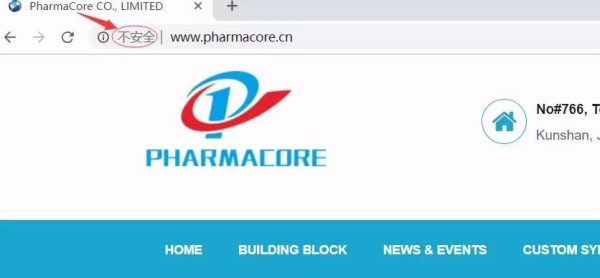
One line of grey text on the left of the address bar: Not secure. Before the buyer has seen a single product spec, they have seen that warning. Their next move is usually not to keep browsing — it is to close the tab and look for the next supplier.
Google and Firefox both do this. Some browsers in China do not, so plenty of owners open their own site and see nothing wrong. The problem is that the buyer is not sitting at your computer. Banks, Amazon, SaaS websites are all https. Overseas buyers built the instinct long ago: padlock means legitimate company.
The image below shows a real http page with no certificate in Chrome — no padlock in front of the URL, just "Not secure". Leaving that on a B2B site is like writing "our website is not very reliable" on your homepage.
HTTPS affects more than trust — it affects inquiries and Google rankings
The core actions on an export site are getting a customer to fill in a form, send an email, or tap WhatsApp. On a page marked "Not secure", buyers hesitate the moment they type their company name and email. Fewer fields convert better — name, email, requirement is the highest-converting three-field setup — but no amount of trimming beats that warning line in the address bar.
On rankings, roughly nine in ten sites in Google's top ten pages are HTTPS. HTTPS itself is a lightweight signal, but it is the pass mark: without it, every other optimization is wasted; with it, you are only back at the starting line. This is also the easiest fix among the causes covered in foreign trade sites with no traffic and no inquiries, yet it is the one most people overlook.
AI search has amplified this. In 2026, Google AI Overviews and AI Mode answer directly at the top. Pew Research measured that when an AI summary appears, about 8% of users click a traditional result, versus about 15% when there is no summary; Ahrefs data shows the number-one click-through rate drops by about 34.5% on queries with an AI overview. To be cited by AI, a page must be crawlable, indexable, and not restricted by nosnippet. A site that cannot even install a certificate properly hardly inspires confidence that its technical foundation is clean. The approach behind AI integrated marketing websites is to level this foundation first, then talk about content and backlinks.
How to choose an SSL certificate in 2026: DV, OV and EV in one table
| Certificate type | What is verified | Browser display | Best for | Price range |
|---|---|---|---|---|
| DV domain validation | Domain ownership only | Padlock | Showcase sites, blogs, test sites | Free to a few hundred RMB per year |
| OV organization validation | Company registration details checked | Padlock, company name in certificate details | B2B sites, factories with brand ambitions | A few hundred to a few thousand RMB per year |
| EV extended validation | Strict corporate identity review | Padlock (new Chrome versions dropped the green address bar) | Large enterprises, finance, platform sites | A few thousand to tens of thousands RMB per year |
For most export showcase sites, DV is enough. A free Let's Encrypt certificate runs perfectly well; the cost is renewing every 90 days, which depends on the host auto-renewing. Miss it and you get a red "certificate expired" warning. If you would rather not deal with that, a few hundred RMB for a one-year DV certificate buys peace of mind.
What you pay for is validation depth, warranty coverage, validity period, and support response — not encryption strength. All three types use the same encryption and show the same padlock. The real value of OV is that the certificate details show your full company name — a small credibility bonus when a procurement officer looks you up with a tool.
5 steps to install an SSL certificate on a WordPress export site
- Confirm your host supports it. Mainstream panels (cPanel, BaoTa, Hostinger dashboard) offer one-click Let's Encrypt. If yours does not, buy a paid certificate — do not force it.
- Issue the certificate. Enter the domain, and make sure www and the bare domain are both included, or issue a wildcard. Otherwise you end up with a padlock on half your pages and none on the other half.
- Install the certificate in the hosting panel and turn on forced HTTPS redirect, so http visits 301 automatically to https.
- In the WordPress dashboard, change both the Site Address and WordPress Address under Settings > General to https, save, then log in again.
- Scan the whole site for mixed content with a tool like Why No Padlock, then check Search Console to confirm the https version is indexed.
When you change servers or hosting providers, the certificate usually has to be reissued and reinstalled, following the same steps. For the migration process, work through the checklist in migrating to another hosting provider — install the certificate before you change DNS and you avoid an extra round of site-wide errors.
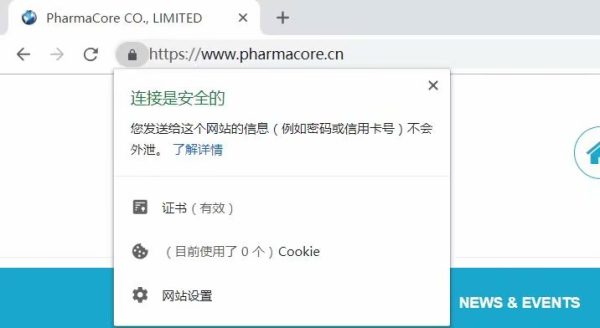
Once it is set up, it looks like this: the URL starts with https, a padlock appears in front, and clicking it shows the issuer and expiry date. Letting a customer confirm who you are with one click costs almost nothing.
No padlock after installation, or a padlock with a warning? Here is how to troubleshoot
This is not rare. The odds depend on your site structure, especially on older sites and ones built with page builders. Check in this order and you will pinpoint it eight times out of ten:
- Mixed content: images, JS, or CSS on the page still use http URLs, so the browser treats the page as partially encrypted and the padlock disappears.
- Incomplete certificate chain: only the domain certificate is installed, without the intermediate certificate. It works on desktop but throws warnings on mobile.
- CDN not syncing the certificate: the origin server is set up, but CDN nodes still run the old config. Purge the cache or re-upload the certificate.
- Plugin hard-coding http links: the database stores absolute URLs. Use a tool to replace them with https in bulk.
- Expired certificate: free certificates expire in 90 days, and a failed auto-renewal task turns the padlock red.
HTTPS is just the entry ticket: three more gates for export sites in 2026
Load speed. Core Web Vitals pass marks are LCP ≤ 2.5s, INP ≤ 200ms, CLS ≤ 0.1; INP replaced FID in March 2024. Google data shows about 53% of mobile users leave a page that takes more than 3 seconds to load. Use an img tag with fetchpriority="high" for the hero image, hard-code width/height on every image, and delay third-party scripts — GA4, chat widgets, pixels — until after the user's first interaction.
Can the page explain who you are? Within 3 seconds of landing, make clear "what product you make + what problem you solve". Product pages need a spec table and MOQ, and contact details must be easy to find. Only when structure and content both pass can an AI summary pick you up.
Repeat orders from existing customers. Winning a new customer costs about 5 times more than keeping an existing one. Certificates, load speed, and inquiry forms directly shape the experience an old customer has when they come back to you. In the build standards for B2B foreign trade websites, these should be default settings, not paid add-ons.
Frequently asked questions
Is there a security difference between free and paid SSL certificates?
No difference in encryption strength, and the padlock looks the same. The differences are validity period, warranty coverage, support response, and validation depth. A free certificate is fully sufficient for a showcase export site, as long as the host renews it reliably.
Will my Google rankings go up after installing SSL?
Not directly. HTTPS is a lightweight ranking signal and works more like a threshold: installing it keeps you from falling behind, but rankings still depend on content, backlinks, and page experience. Nine in ten top results are HTTPS, which shows it is the standard, not an advantage.
What happens when a certificate expires?
The browser shows a full-page red warning — "Your connection is not private" — and the customer has to click "Advanced" to get in. Most procurement people quit at that point, which is worse than having no certificate at all. Free certificates expire after 90 days, so make sure the auto-renewal task is actually running.
Do I need to redo the certificate when I change servers or domains?
Yes. A certificate is tied to a domain. Changing servers means reinstalling it in the new environment; changing domains means reissuing it. The recommended order: install and test the certificate on the new server first, then switch DNS, so you avoid hours of site-wide warnings in between.