

Conclusion first: there is no application page for Google Sitelinks and no submission form. Google only shows 2–6 sub-links under your title when your site ranks first organically for a query, your navigation is clear, your internal link depth is short, and your core pages can be crawled. In 2026 the right order is to earn the ranking first, then fix the structure. Sitelinks are an outcome, not a goal.
What Google Sitelinks are, and why only the #1 result gets them
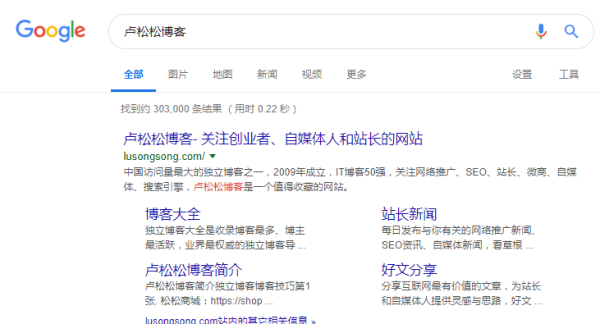
The linked sub-items under a site's main title in the search results are Sitelinks. They are not hand-picked. Google extracts them automatically from your site structure: they might be About Us, Products or Contact, or a few high-traffic category pages. For buyers, these links work as shortcuts. No need to go back to the homepage and click through layer by layer — they land straight on a product page or an inquiry form.
The threshold is a single condition, but a hard one: your site must rank first in organic results for that query. It can be a brand term, such as your English company name, or a product term, such as a specific model number. Rank second or third and the algorithm will not give you sub-links. So Sitelinks are a by-product of ranking and cannot be optimized on their own.
Two formats are common: a full block of sub-links under the result when someone searches your company name, and a few site links attached to an ordinary search result. Export sites run into both; the first carries more brand value.
The 6 conditions for Sitelinks — a 2026 self-check
Ranking is only the ticket. What really decides whether Google picks you is whether your site can be split into clear blocks. Use the table below as a checklist.
| Condition | Requirement | How to check in 2026 |
|---|---|---|
| Rank #1 for the target query | Position 1 organically for a brand or product term | Search Console Performance report, filter average position = 1 |
| Clear main navigation | 5–8 items, short labels, copy stays stable over time | Check on mobile whether the first screen collapses into a menu button |
| Shallow click depth | Core pages reachable within 3 clicks from the homepage | Click-depth report in your crawler |
| Title matches the page | Candidate sub-pages have short titles with keywords | Check page by page that title and H1 cover the same thing |
| Core Web Vitals pass | LCP ≤ 2.5s, INP ≤ 200ms, CLS ≤ 0.1 | Core Web Vitals in Search Console, 28-day rolling window |
| Crawlable and indexable | Not limited by nosnippet / max-snippet / data-nosnippet | Check robots meta and page-level settings |
The item most often skipped is Core Web Vitals. When mobile pages take more than 3 seconds to load, about 53% of users leave immediately (Google data). Sitelinks point to sub-pages; if pages open slowly, users who click through leave too. The highest-ROI fix is setting fixed width/height on every image to control CLS — a ten-minute job.
Another move is deferring third-party scripts. GA4, Meta Pixel, live chat and pop-ups are the main drags on INP. A common approach is to load them only after the user's first touchstart, mousemove or scroll.
How to restructure your site so Google releases sub-links
- Cut main navigation to 5–8 items. Keep labels short and stable; don't rewrite them every month.
- Core pages should be no more than 3 clicks from the homepage. The shallower the level, the more likely a page gets pulled in as a sub-link.
- Write a clear title and H1 for every page, and make both point to the same thing — not a product on one and a company profile on the other.
- Keep breadcrumb navigation. It tells both users and crawlers which level the page sits on.
- Put a spec table and MOQ on product pages. Keep the inquiry form to three fields — name, email, requirement — the combination with the highest conversion rate.
- Submit an XML sitemap and confirm in Search Console that all candidate sub-pages are indexed.
Once these are done, most sites become "splittable" in structure. What remains is ranking: without a query where you rank #1, clean structure alone will not produce sub-links.
With AI Overviews taking clicks, are Sitelinks still worth it?
Yes — but think about them differently. Pew Research measured that when an AI summary appears, users click traditional results about 8% of the time, versus about 15% without one. Ahrefs data shows CTR for the #1 result drops about 34.5% on queries with an AI Overview. That set of numbers doesn't look encouraging on its own.
Now the other set: Ahrefs research from March 2026 found that only 37.9% of URLs cited in AI Overviews also appeared in the top 10 organic results for that query, down from about 76% in July 2025. Rankings and AI citations are decoupling. Google's own line is blunt: getting into AI Overviews and AI Mode needs no extra structured data, special files or Markdown — "good SEO is good GEO."
The conclusion: rankings haven't changed; only the shape of the results page has. AI simply summarizes pages that already rank. And Sitelinks cover exactly brand terms and precise product terms — people searching your English company name are already looking for you. These queries are the least disrupted by AI Overviews, so sub-links become the shortest path to conversion. To steady your brand-term rankings first, follow the diagnostic order in why your foreign-trade website gets no traffic or inquiries.
From a new site to Sitelinks: a process you can follow
New sites rarely earn sub-links quickly, and that's normal. Work through this order — there aren't many actions, but they need to be continuous:
- Lock in 3–5 terms you can realistically rank #1 for — usually your English company name plus 2–3 long-tail product terms.
- Track their position weekly in the Search Console Performance report.
- Fix Core Web Vitals in parallel: serve the hero image as an img with fetchpriority="high", not a CSS background-image.
- Add content and backlinks. For link-building ideas, see the English backlink guide for exporters; for competitor link sources, see how to get a competitor's backlink resources.
- Recheck Search Console after 4 weeks. Core Web Vitals uses a 28-day rolling field-data window, so changes take 4 weeks to show.
- Using the approach in analyzing competitor websites, see which pages rivals' Sitelinks point to and work backwards to what your own navigation should include.
If your site is already messy — a dozen-plus nav items, product pages with no spec table, mobile pages that take three seconds to open — check the baseline configuration in B2B foreign-trade website solutions before patching things layer by layer. It saves time.
FAQ
Can Sitelinks be set manually or applied for?
No. Google offers no submission entry point, and you cannot designate specific pages in Search Console. All you can do is make candidate pages clearly structured, with unambiguous titles, and crawlable. The algorithm decides the rest.
How long does it take for a new site to get Sitelinks?
There is no fixed timeline; it depends on how fast you reach #1 for a query. New domains usually need a few months of content and backlinks before they can hold #1 on brand terms. Even then, sub-links typically lag behind the ranking by a while.
My company name search shows no sub-links — what's wrong?
Confirm three things first: does your English company name already rank #1; is the homepage navigation clear enough to be split into blocks; and are candidate sub-pages blocked by noindex or nosnippet. If all three are fine, check whether Core Web Vitals pass, especially INP.
Are the number and content of Sitelinks fixed?
No. How many show and which pages appear change with the query and your site structure. The same site often shows different sub-links for a brand search versus a product search. That's normal.