

Should Your Export Site Install a Free Live Chat System? The Short Answer
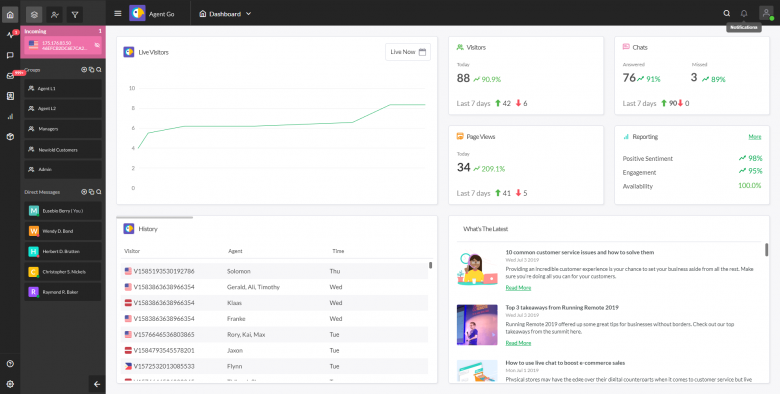
Yes. In 2026 tawk.to is still the easiest free option: sign up, grab a JS snippet, paste it into your site, and visitors can chat from the bottom-right corner of the page — no WhatsApp, Skype, or software install needed. The dashboard also shows which country each visitor comes from and how many visits you get per day.
But know the cost up front: chat scripts are third-party JS and one of the top causes of slow INP. The right way is lazy loading — wait until a visitor first taps, scrolls, or presses a key, then load the chat widget. Don't let it compete for first-screen resources.
Below is the 2026 reality: sign-up, embedding, pitfalls, and speed — four things, clearly explained.
What Is tawk.to, and How Is It Different From WhatsApp or Skype?
It's in-page, real-time chat — not a messaging app. Visitors don't add you as a friend or leave a phone number. They open your product page, see the chat bubble, and click to talk. For B2B inquiries, the less friction at this step, the easier it is to get that first sentence.
The second value is traffic stats. The dashboard shows today's visits, visitor countries, and referring pages. Pair that with Search Console keyword data and you can tell which product pages people actually read and which just rank well. Questions like why your independent export site gets no traffic or inquiries often have an answer in your own dashboard data.
The third value is offline fallback. When your sales team is off the clock or time zones don't line up, incoming chats automatically turn into messages — leave an email and you can reply. For companies selling into Europe and the US, that matters more than "online rate."
6 Steps to Install tawk.to in 2026
- Go to the tawk.to site and register an account. Use a Gmail address — Tencent mailboxes don't receive the verification email.
- Create a new Property in the dashboard (enter your domain), and the system generates an install snippet.
- On WordPress, put the snippet before footer.php in your theme, or use a header/footer insertion plugin. On non-WordPress sites, paste it into your global template just before
. - Back in the dashboard, set the appearance: bubble position, color, welcome message, and whether it auto-opens. On mobile, keep only a small bubble so it doesn't cover product images.
- Install the mobile app and desktop client so your sales reps can reply anytime. iOS and Android are supported.
- Set up the offline form: when you're offline, switch to a message form automatically. Keep just three fields — name, email, requirement. That converts best.
After pasting the code, test it yourself on a phone over 4G: does the bubble appear, does it lag when opened, do messages reach your inbox? Don't just check on desktop.
Will the Chat Script Slow My Site? How to Handle INP in 2026
Yes. The 2026 Core Web Vitals thresholds are LCP ≤ 2.5s, INP ≤ 200ms, and CLS ≤ 0.1, and third-party scripts — GA4, Meta Pixel, live chat, popups — are the main INP killers. The earlier the chat script loads, the busier the main thread, and the slower the response when a visitor clicks a button.
A workable approach is to delay loading until the user's first interaction. The moment a visitor scrolls or taps, inject the tawk.to JS. The first screen stays unaffected, and real chat needs are still met. Another low-cost move: use a real
For a systematic look at performance and structure, see how B2B export websites organize their pages. If your site is brand new, check the version and pricing comparison first to confirm which plan you're on, then decide whether to change code or switch themes.
Is the Free Plan Enough? 2026 Features and Limits
| Item | Free plan reality | Impact on trading companies |
|---|---|---|
| Price | 0, unlimited seats | Small teams don't need budget approval |
| Chat type | In-page real-time chat, no visitor install | Low barrier to the first message, good for inquiries |
| Traffic stats | Visits, visitor country, and referring page visible | Lets you work backward to which product pages perform |
| Offline handling | Auto-converts to an offline message | No inquiries lost across time zones |
| Clients | Desktop + mobile app | Sales reps can reply from anywhere |
| Sign-up email | Gmail works; Tencent mailboxes don't | Switch email before you register |
The free plan is enough for most small and mid-sized exporters. Paid is really for long-term chat archiving, removing branding, and multi-agent routing rules.
One thing often overlooked: the chat window itself is an email collection point. With a clear privacy note, the addresses you collect can go straight into your mailing list. B2B cold email reply rates average about 1%–5% across the industry; a tight list plus short copy can reach 8%–15%. For deliverability, see how to use Google Postmaster Tools to improve email deliverability.
After Launch: Handling Spam Inquiries and Harassment
Once chat is live, you'll get more than real inquiries — link sellers, ad spammers, bots filling the message form. The rule is block first, clean second: turn on email and IP blacklists in the dashboard and block repeat offenders outright; add a simple arithmetic check to the message form to stop most automated submissions.
If the harassment comes from site comments and forms rather than the chat window, see the ultimate guide to handling spam inquiries and comments in WordPress. Chat spam is less common, but sales reps need the right mindset: nine out of ten messages are junk, and the tenth might be a full container order.
Also, don't treat chat as your only entry point. Say who you are and what you solve within the first 3 seconds, and put spec tables and MOQ on product pages. Those basics decide whether a visitor opens the chat bubble at all. Tools only amplify.
FAQ
Will tawk.to's free plan stay free in 2026?
Yes. The free plan has unlimited seats and unlimited chats; the company charges for add-on features. For most export sites, the free plan's traffic stats, offline messages, and mobile app cover daily needs.
Why don't I receive the verification email after signing up?
It's almost always the mailbox. Use Gmail when you register — Tencent mailboxes (QQ, Foxmail) often don't receive it. Registering again with a different email is faster than clicking resend repeatedly.
The chat script slowed my site down. What now?
Change the script to load after the visitor's first interaction, and keep it off the critical first-screen path. Also check that your LCP image uses fetchpriority="high", and that all images have fixed width and height to control CLS. After the fix, allow about 4 weeks for it to show in the 28-day rolling data in Search Console.
Can visitors chat without installing software? What about my sales team?
Visitors install nothing — they chat right on the page. Your sales reps need the desktop client or the mobile app to reply from anywhere; when they're offline, chats automatically convert to messages.