

WordPress spam protection that actually works comes down to a three-layer setup: honeypot fields plus a CAPTCHA on the form, with a submission time threshold; WHOIS privacy on the domain; and your public email shown as an image. In 2026, bots scan inquiry forms on foreign-trade sites almost every day. Install a single CAPTCHA plugin and spam submissions usually start leaking through again within two weeks.
Why does your WordPress inquiry form keep getting spam?

The spam isn't aimed at you personally. Bots run on scripts that scan domains in bulk for pages with forms, and they flood whichever site has the weakest protection. That's why a machinery parts site gets gambling promo links and an LED lighting site gets English crypto ads.
There are four common entry points: the Contact Form 7 inquiry form, the blog comment area, the member registration page, and the email subscribe box. Most site owners only notice when a pile of outbound links shows up in the comments — by then the bots have already submitted thousands of times.
The cost isn't just a messy inbox. Your sales team wades through dozens of fake inquiries a day while the buyers who actually want a quote get buried. Winning a new customer costs about 5x more than keeping an existing one, and if spam comments are visible on the front end, a new visitor clicking in and seeing gambling links first is a trust hit that's much harder to repair.
The 5 most effective WordPress anti-spam methods
- Turn on domain WHOIS privacy. If you didn't check privacy protection when you registered the domain, your email goes into the public record and anyone can look it up for free. That address is usually your working business inbox.
- Add a honeypot field to your forms. Put in an input field that real visitors can't see but bots fill in. If it has content, the submission is discarded.
- Use a CAPTCHA. reCAPTCHA v3 or Cloudflare Turnstile both work — they require the sender to prove they're human. Turnstile is lighter on visitors and won't make buyers click traffic lights or pick out zebra crossings.
- Set a submission time threshold. A person needs 3–5 seconds to fill in name, email and requirements; a bot submits instantly. Treat anything under 2 seconds as suspicious and you'll block most scripts.
- Protect your email from scrapers. Turn the address on your contact page and footer into an image. Bots read text, not images, and people can still see it.
Any one of these alone will leak. Honeypots don't stop scripts written against your exact rules, CAPTCHAs don't stop manual bulk senders, and time thresholds don't stop slow submissions. All three together cost almost nothing and bring the leak down to a volume you're happy to handle by hand.
What each of the four defenses blocks and what it costs you
| Method | Mainly blocks | Side effects | Where to enable |
|---|---|---|---|
| Honeypot hidden field | Bulk scanning bots | Some browser autofill may fill it by mistake — check a week of logs | All inquiry forms |
| CAPTCHA (Turnstile / reCAPTCHA) | Scripted submissions | A low v3 score can flag real users; slow to load in some regions | Forms, registration, comments |
| Submission time threshold (2–5 seconds) | Scripts that fill in instantly | Set too strict and it blocks buyers using autofill | Inquiry forms |
| Email as image | Email harvesting crawlers | Visitors can't copy the address directly | Contact page, footer |
| Comments held for moderation | Comment links and advertorials | Legitimate comments don't appear right away | Company blog |
One warning: don't install four or five anti-spam plugins at once. If a mobile page takes more than 3 seconds to load, about 53% of visitors leave. One form plugin with a built-in honeypot plus Turnstile, and a manual submission-time check, is enough for the vast majority of sites.
Fewer fields is better: how to design a 3-field inquiry form
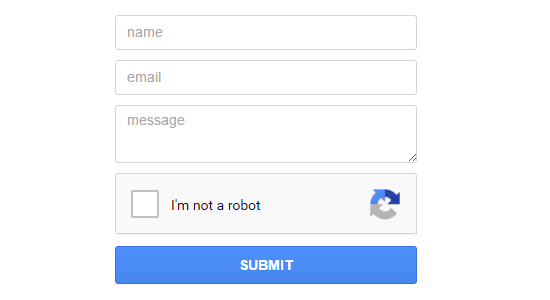
Perfect spam protection still won't bring inquiries if the form is wrong. In 2026, the highest-converting inquiry form on an independent export site has three fields: name, email, requirements. Every extra required field is one more reason to give up.
Move questions like company size, annual purchase volume and target market to the product pages. Let buyers absorb specs, MOQ, lead time and certifications while they read about the product, instead of being interrogated in the form. Within the first 3 seconds they should know who you are and what problem you solve.
Plan the form and the product pages together. If you sell B2B, see B2B foreign trade website solutions to lock down the inquiry path and product structure at the same time. And if the site has no traffic at all, fix traffic before worrying about spam — see why your independent export site has no traffic or inquiries.
After your email gets scraped, how to recover deliverability
A public email being harvested is only the start. The bigger problem is someone spoofing your domain to send bulk spam. Your domain reputation collapses, your real quote emails land in customer spam folders, and your sales team assumes the customer just isn't replying.
Order of operations: confirm the SPF, DKIM and DMARC DNS records are all in place, then check domain reputation and spam rate in Google Postmaster Tools. Steps are here: improve email deliverability with Google Postmaster Tools.
If you already have hundreds of spam inquiries and comments on the site, don't delete them one by one — batch processing is faster. Method: the ultimate way to handle WordPress spam inquiries and comments.
6-step checklist after go-live
Don't close the page just yet. Spend 20 minutes on these steps and save yourself months of troubleshooting.
- Submit a real form from a browser you've never used and confirm the inquiry reaches the sales inbox.
- Deliberately fill in the honeypot field and confirm the submission is blocked.
- Submit once with a script in under 1 second and check whether the time threshold fires.
- Open the contact page on a phone over 4G and confirm the CAPTCHA loads correctly.
- Go through the public comments, clear historical spam and switch to moderation before publishing.
- Run PageSpeed Insights and confirm the anti-spam scripts didn't push INP past 200ms.
With the check done, compare inquiry volume over the following week. If real inquiries clearly drop, your settings are too strict — loosen the time threshold to 3 seconds, switch the CAPTCHA to invisible mode and watch again.
FAQ
I installed a CAPTCHA and still get spam inquiries. Why?
Three possibilities: the CAPTCHA is only on the contact form, not on popup forms or the subscribe box; a plugin conflict is breaking validation, so test a submission in incognito mode; or it's manual bulk sending, which a CAPTCHA can't stop — you need the honeypot, time threshold and keyword filtering as well.
Too many spam comments — should I just turn comments off?
Turning off comments on a company blog has almost no effect on rankings or inquiries. If you want to keep the interaction, set comments to hold for moderation and add a keyword blacklist so anything containing a link goes to the pending queue.
Cloudflare Turnstile or reCAPTCHA — which one?
For European and North American buyers, either works. Turnstile is invisible to visitors in most cases and doesn't load Google scripts, which is friendlier to page speed. reCAPTCHA v3 has a mature ecosystem, but low scores can misjudge real users — loosen the threshold and watch for a week first.
Will anti-spam settings hurt normal inquiry conversion?
Yes, if you set them too strict. Keep the time threshold under 5 seconds, keep only name, email and requirements as required fields, and avoid old CAPTCHAs that make people pick images. Compare a week of inquiries after go-live and relax the settings if they drop.