

Auto-syncing Instagram photos to your WordPress site takes one Instagram Feed plugin. No developer account needed — photos can appear on your site within 30 seconds of install. One warning first: in 2026 WordPress dropped native Instagram oEmbed support, so Instagram links embedded in older posts will break. A plugin is the only fix. Here is the full method, plus the pitfalls to avoid.
Why should a foreign-trade site sync Instagram photos to its own website?
Instagram traffic belongs to the platform. Website traffic is yours. Sync your photos and every post becomes a content update. When buyers see factory shots, loading scenes and trade show photos on your own domain, trust runs higher than with product renders alone.
New visitors decide who you are and what you solve within 3 seconds. A live feed beside your product images adds one more signal: this company is still running. Returning customers see the latest updates, which makes a repeat-order conversation easier to open — winning a new customer costs about 5x more than keeping an existing one.
What is different in 2026 compared with 2022?
The biggest change: WordPress no longer supports Instagram oEmbed natively. Paste an Instagram post link on its own line and WordPress used to render a card automatically. That ability is gone. Old embeds may now show as a bare link or nothing at all.
The second change is on the search side. Google I/O 2026 reported AI Mode at roughly 1 billion monthly users, and AI Overviews now answer many informational queries directly at the top of the page. Pew Research testing shows users click traditional results about 8% of the time when an AI summary appears, versus about 15% without one. That means a photo wall will not bring search traffic. What it brings is conversion after the visitor lands.
The conclusion is clear: Instagram sync solves on-site trust and content freshness. Real search traffic still comes from product pages and articles. The two do not conflict — just do not expect a feed widget to rescue your rankings.
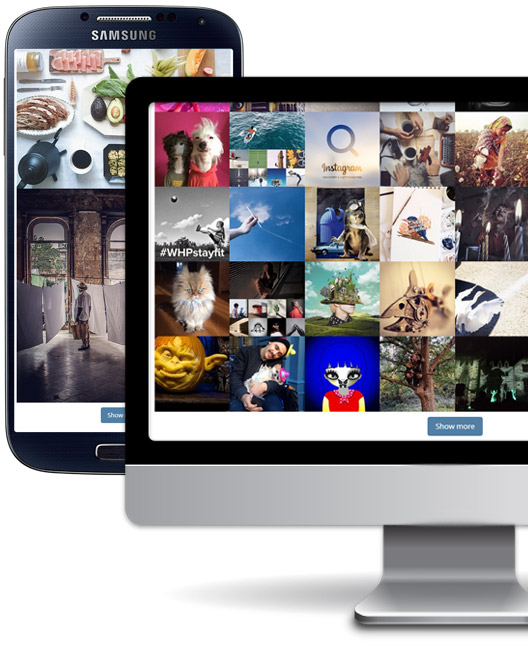
How to choose a plugin? Cost comparison of three options
Options fall into three groups: free feed plugins, paid feed plugins, and custom code calling the Instagram API. Custom code is the most expensive and the least stable — one API permission change and you rebuild. Unless you have a full-time developer, skip it.
Free plugins do the job but usually cap the number of images, add the author's watermark and refresh cache slowly. Paid versions unlock multiple accounts, custom layouts and automatic cache refresh. For a B2B site, go straight to the paid version. A few dozen dollars a year is cheaper than rework.
| Option | Setup time | Main limits | Best for |
|---|---|---|---|
| Free feed plugin | 10–30 minutes | Capped image count, watermark, slow refresh | Early-stage SOHO sites |
| Paid feed plugin | 30–60 minutes | Annual fee, account binding required | B2B/B2C sites posting steadily |
| Custom API integration | 1–3 days | Ongoing upkeep when the API changes | Larger sites with in-house developers |
Whichever you pick, first confirm it automatically takes over existing Instagram embeds on your site. In 2026 this step is critical — otherwise posts you published three years ago all become dead links. For setup details, see the configuration notes in B2B foreign-trade websites.
Implementation: from plugin install to launch in 5 steps
The process is not hard. The details are. Work through it in this order and you should clear it in one pass.
- Confirm your site runs the WordPress overseas edition, and that your PHP version and theme both support the plugin.
- Search for and install an Instagram Feed plugin in the dashboard. Activate it, then connect and authorize your Instagram business account as prompted.
- Insert the feed block under Appearance — Widgets or in your page builder. Set the image count (6–12 recommended), the number of columns, and whether to show like counts.
- Set the cache refresh interval. Too frequent slows the page; 1–6 hours is recommended, shortened during peak shipping season.
- Test on mobile: are images distorted, is the form covered, does clicking go to the correct Instagram profile?
Do not stop at launch. Run the speed check below next. If you have not built your site yet, start with the environment checklist in website building services.
Will a photo wall slow my website down?
Yes — it is the most common problem with this type of plugin. Instagram images come from an external CDN and you do not control their dimensions. Loading 20 at once easily drags down the first screen. On mobile, about 53% of users leave when loading takes over 3 seconds (Google data).
Several ways to control it: place the feed in the lower half of the page, never above the fold; hard-code width/height on images to prevent layout shift; keep thumbnails to 12 or fewer; turn on lazy loading. Core Web Vitals pass marks are LCP ≤ 2.5s, INP ≤ 200ms, CLS ≤ 0.1.
One more trap: third-party scripts are the biggest killer of INP. GA4, Meta Pixel and live chat popups together make every interaction feel sticky. The usual fix is to delay those scripts until the user's first interaction (touchstart, mousemove, keydown, scroll).
Do not check Search Console right after the changes. Core Web Vitals uses a rolling 28-day window of real user data, so allow about 4 weeks for it to reflect. If you want faster results, add Cloudflare APO (around USD 5/month) to cache HTML at the edge and push TTFB down to 30–80ms.
Beyond syncing: how Instagram traffic actually turns into inquiries
The photo wall is only the entrance. Product pages decide whether you get the inquiry. Specs, MOQ, lead time and certifications must all be spelled out on the page. Keep form fields to a minimum — name, email and requirement convert best. Do not ask for company size and annual purchase volume up front.
Two social-side moves are worth doing: put your website link in the Instagram bio, and connect photo syncing with TikTok short videos. For the link setup on TikTok, see how to add your website link in TikTok — both channels can reuse the same assets.
Also avoid the common social account mistakes early: posting only product shots, never replying to comments, copying the same caption to every platform. These details eat the followers you worked hard to gain. Run a self-check against 7 common social media marketing mistakes to avoid.
If you also run Google Ads, keep the tone of your social content and your search landing pages consistent, or visitors will feel they landed in the wrong place. For campaign ideas, see five promotion programs on Google platforms.
FAQ
Can sites outside the WordPress overseas edition auto-sync Instagram?
Yes, but plugin compatibility and theme conflicts are more likely. On non-overseas environments the usual problems are failed authorization in the dashboard, images not showing, and misaligned page-builder blocks. Get it working on a staging site before pushing to production.
Do synced photos affect Google indexing?
A photo wall rarely earns rankings by itself, because the images come from an external CDN and the page carries little text. Its value is on-site trust and content freshness. Search traffic still comes from product pages and articles. In 2026 Google itself stated plainly that good SEO is good GEO.
Photos stopped updating after the plugin was connected. What now?
Clear the plugin cache and the site cache first, then check whether the Instagram authorization has expired. Expired authorization is the most common cause — logging in again usually restores it. If it still does not update, set the refresh interval to 1 hour temporarily and watch.
Does this feature cost money?
The plugin comes in free and paid versions, with paid usually a few dozen dollars per year. Clients who build through a website service provider can usually get it configured once for free — ask your account contact. For high-end custom builds, see custom sites for high-end industries.