

In 2026, the fastest way to install an app from Google Play on an Android phone is this: open play.google.com, find the app detail page, copy the package name that follows id= in the URL, and use that package name to get the installer from a trusted source. Searching for an APK by icon and Chinese name is the most common way export sales reps get phished.
Why “search the app name + download APK” is the riskiest approach
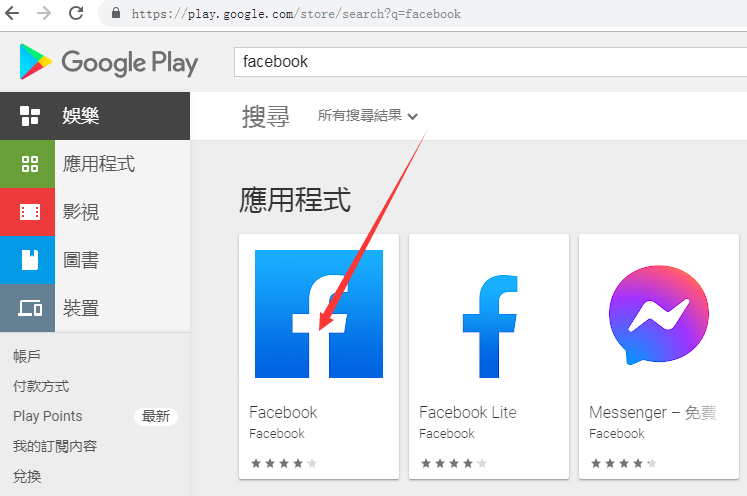
Anyone can copy an Android app's icon, name and description. Fake installers for WhatsApp, Facebook and Telegram sit in search results for months, and the first thing they do is read your contacts and SMS. For exporters who talk to buyers on those apps all day, the contact list and chat history are the whole business.
The package name is the one thing that cannot be faked. It is registered by the developer and unique worldwide — the main Facebook app, for example, is com.facebook.katana. Names change; package names don't. So judge an installer by its package name, not its icon.
Then check three more things: does the developer name match the Play page, was it updated in the last three months, and are the screenshots the same set as on Play. If two of the three don't match, delete the file.
Which field on the Play page is the real “download key”?
Play detail page URLs follow a fixed pattern: https://play.google.com/store/apps/details?id=com.facebook.katana. The part after the equals sign is the package name. Copy it in full, including every dot.
Once you have the package name, use it two ways. First, go back to the phone and search that package name in the manufacturer's own app store to confirm you're looking at the same app. Second, send it to IT or the colleague who handles procurement so everyone gets the same build instead of each person installing a different version.
If your company network can reach Google services, signing in with your own Google account also shows the “Installed” and “Compatible devices” sections. That tells you whether the phone's OS version is high enough and which past devices ran the app — far more reliable than forum posts.
Choosing among four install channels: the differences in one table
| Channel | Requires Google Play services | How it updates | Security risk | Best for |
|---|---|---|---|---|
| Google Play Store | Yes | Automatic | Low | Personal daily phone, long-term use |
| Manufacturer's overseas app store | No | Update prompts inside the store | Fairly low | Chinese phones without Google services |
| APK from the software vendor's official site | No | In-app prompt or manual | Low (stick to the official domain) | Single device, temporary testing |
| Third-party APK mirror sites | No | Manual | High (the file can be swapped at any time) | Emergencies only; remove the source afterwards |
The order of choice is simple: if you can reach Play, use Play. If not, use the manufacturer's store. If the store doesn't have it, go to the vendor's official site for the Android download. If none of those work, consider a mirror site — and check the signature and permissions right after installing.
Links to the third-party APK scraper sites mentioned in older tutorials break all the time. Those sites live on ads, and the “Download” button often points somewhere else. One wrong click and you've installed another junk cleaner app.
No Google Play services on the phone? How to install the apps exporters actually use
- First check whether the vendor's official site has an Android download page. Messaging tools like WhatsApp, Telegram and Skype almost always do.
- Open the phone's built-in app store and search by English name or package name. The overseas stores from Huawei, Xiaomi and OPPO cover a lot.
- For company-issued work phones, let IT push the app through mobile device management (MDM). Package name and version are set once, and reps don't reinstall when they change phones.
- After installing, go straight to system settings and turn off “Allow installation of apps from unknown sources”. Switch it on only while you're actively installing.
- Rename the installer file as “app name + package name + version number”, save it to the company shared drive, and grab it next time you change phones.
One reminder: how software is distributed and used must follow local network regulations and the software licence terms. When a company installs commercial software in bulk, buy through official channels — don't save a little money on cracked versions.
Five checks before you tap that installer
- Package name: exactly the same as the string after id= on the Play page. Not one character off.
- Developer name: identical to the developer shown on Play. Fakes often use a similar spelling.
- Permission list: a chat app that wants to read SMS or use accessibility services is a red flag.
- File size and version number: if they're far off what the official site lists, the file has been modified.
- Install source: if the system says “this app came from an unknown source”, note the domain and don't go back.
These five checks take under two minutes and block the vast majority of fake installers. A sales rep's phone often holds hundreds of buyer contacts — it's worth the two minutes.
The app is just the door. What exporters should really watch is the inquiry landing page
The app is only the entry point; buyers still end up on your website. Google's data shows that when a mobile page takes more than 3 seconds to load, about 53% of users leave immediately. If a link a rep sends in WhatsApp takes four or five seconds to show content, that lead is usually gone.
Three things on the landing page actually drive inquiries: the first screen explains who you are and what problem you solve within three seconds; product pages give a spec table and MOQ; forms ask only for name, email and requirement — the more fields, the fewer people finish. Getting these details right beats installing ten more apps. Lock this structure in when you build your B2B export website and later changes get much easier.
Don't drop the email side. When a buyer leaves an address on your site, follow-up depends on deliverability — Google Postmaster Tools shows domain reputation and spam rate. If inquiries are thin, work through the common causes in an export site with no traffic and no inquiries; if you need to build a site that can absorb app traffic from scratch, export website development has a structure you can copy.
FAQ
Play says “this app is not compatible with your device”. What now?
Usually your OS version is below what the app requires, or the app isn't open to your account's region. Update the system and try again. If it still fails, get the Android installer from the vendor's official site — and check the package name before installing.
Can an APK from a third-party site carry a trojan?
It can, and you won't spot it from the icon or the file size. After installing, run the built-in security scan or Play Protect and look closely at which permissions it requests. Don't test unknown installers on the phone you close deals with.
Does WhatsApp still work without Google Play services?
Yes. Installing and sending messages don't depend on Google services, and updates come from in-app prompts. What you lose is Google account backup, Play in-app purchases and similar features.
What's the easiest way to install apps across a sales team?
Push them through an MDM console. Package name, version and permission policy are set once; swapping phones or collecting them when staff leave takes one click, and nobody can install a modified build from an unofficial channel.