

Email management software built for export sales reps solves three things: knowing whether a customer opened your email, sending a development letter to many prospects without them seeing each other, and keeping every follow-up note in one place. Desktop clients like DreamMail Pro put sending, receiving, tracking, bulk mail and customer records in one tool, saving time over webmail alone. In 2026 the industry average B2B cold email reply rate is about 1%–5%; with a tight list and short copy it can reach 8%–15%. Getting tracking and your list right matters more than rewriting your copy.
Why shouldn't export sales reps send development emails from webmail alone?
Webmail shows you 'Sent', but it won't tell you what time a customer opened the email, which city they were in, or whether they used a phone or a laptop. Yet follow-up timing is hidden in exactly that data. If you reach the same customer on WhatsApp or by phone within the hour after they read your email, the odds of closing change noticeably.
The second problem is bulk sending. Copying a list of strangers on one email lets every recipient see each other — you've handed your customer list to competitors. Bulk one-to-one display, where each recipient sees only themselves and the sender, is basic etiquette in export development.
The third problem is data ownership. Webmail scatters customer records across the inbox, and the thread dies when a rep leaves. A desktop client keeps customer info, follow-up notes and attachments locally or in a folder you can migrate, so handover is a straight copy. Customer follow-up Excel sheet and CRM tool system for export sales reps can be used alongside an email client: the client handles sending and tracking, the sheet handles pipeline view and reminders.
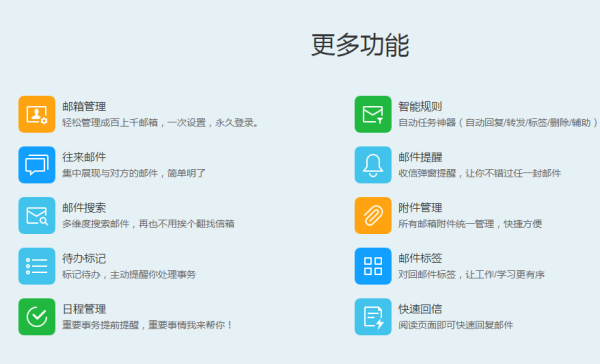
How to use email tracking: from 'Sent' to 'the customer read it three times'
Email tracking is not the same as a read receipt. A read receipt requires the recipient to click 'confirm', and customers almost never do. Tracking works by embedding a tracking identifier in the email and recording the open time, location and device when the recipient loads images. You don't wait for confirmation — open the tracking list after sending and the status is there.
Work through it in this order:
- Set up a separate signature for tracked emails. State your company, product and MOQ so the customer knows at a glance who you are.
- Check for an open record within 24 hours of sending. If there's none, resend after 48 hours with a different subject line — don't resend the same email unchanged.
- If it was opened but there's no reply, send a short follow-up a day later asking one question, e.g. 'Would you like me to adjust the spec sheet for your market version?'
- If the same customer opens it three times or more with no reply, switch to instant messaging via WhatsApp official download page: latest installers for PC, Android and iOS, updated weekly. That beats more emails.
Note: some clients or corporate mailboxes don't load remote images by default, so tracking may show 'unread'. Don't treat tracking results as your only signal.
Feature comparison of mainstream email clients: must-haves vs nice-to-haves
Don't pick by feature count — pick by how much it overlaps with your daily work. The table below breaks it down by real export sales scenarios.
| Feature | Problem it solves | Must-have? | How often used |
|---|---|---|---|
| Email tracking | Shows whether and when a customer opened, so you can time the follow-up | Must-have | Daily |
| Bulk one-to-one sending | Each recipient sees only themselves and the sender; protects your customer list | Must-have | Weekly |
| Personalized batch sending | One email per person with different content, e.g. quotes or payslips | Nice-to-have | As needed |
| Customer profiles and follow-up notes | Background and past quotes kept in one place | Must-have | Daily |
| Email templates and signatures | Less retyping, a consistent outward image | Must-have | Daily |
| Mail rules and labels | Auto-sort inquiries, samples and complaints | Nice-to-have | Set once |
| Portable setup (USB/cloud drive) | No data loss when you change computers; usable on the road | Nice-to-have | As needed |
DreamMail Pro covers most of the rows above; some features are paid or VIP-only. The official introduction and latest download are at https://www.cy-email.com/. If your business is already running, it's also worth reviewing the inquiry form setup on your B2B export website — fewer fields is better; name, email and requirement convert best.
Bulk one-to-one and personalized sending: how to stay out of spam
A tool can send in one click, but deliverability depends on the list and the content. For cold email in 2026, get these steps right before you hit send.
- Clean the list: remove bounced addresses and generic mailboxes like info@ and sales@; prioritize addresses with a real person's name.
- Keep the subject short: under 50 characters, state the product and its use, and skip empty subjects like 'cooperation opportunity'.
- Keep the body under 120 words: paragraph one says what you do, paragraph two gives a specific spec or case, paragraph three asks a single question.
- Control your sending pace: don't push more than a few dozen emails per domain per day, spread them across time slots, and don't blast them all at once in the early hours.
- Include an opt-out: a legitimate development email gives the recipient a way to say no, and that actually raises reply rates.
Personalized batch sending fits situations where you already have customer data — different price quotes for different customers, or product pages in different languages for different markets. Templates plus variables handle this; no manual editing needed. Repeat orders from existing customers are worth the investment: winning a new customer costs about 5x more than keeping an existing one. Use bulk one-to-one for new-product notices to existing customers rather than for bombing a list of strangers.
Finding customers in 2026: what you need beyond an email client
Email is only one touchpoint. In May 2026 Google I/O reported AI Mode at roughly 1 billion monthly active users, and AI Overviews now answer a large share of informational queries right at the top of the page. Pew Research measured a click-through rate of about 8% on traditional results when an AI summary appears, versus about 15% when it doesn't. That means customers searching for suppliers click through to your website less and less. Your job is to be visible where they already are.
Three practical moves: build out your product pages properly, with specs, MOQ and certifications spelled out, because AI cites pages that already rank; push content to social platforms and cut the repetitive work with one-click auto-publishing of your site content to major social platforms – marketing without the busywork; and grow your social accounts, using entry points like Instagram Android download: latest APK v255.1.0.17.102 to put product photos where customers actually look.
Also don't skip the basics: without SSL, Chrome labels your site 'Not secure' and inquiries drop off; if mobile load time passes 3 seconds, about 53% of users leave. None of that is about email, but it decides whether a customer ever gets as far as emailing you. For a structured look at site building, start with website building services.
FAQ
Can customers tell I'm tracking their email?
Tracking relies on remote image loading. The customer sees no 'you are being tracked' notice, but if they've turned off automatic image loading the record may not appear. So treat tracking as a reference, not as proof that a customer isn't interested.
How many emails can I send in one bulk one-to-one run?
That depends on your sending mailbox and server limits, not on the client. For a new mailbox, start at a few dozen a day and scale up gradually while watching your bounce rate — a high bounce rate drags down deliverability for your whole domain.
Can I use a desktop client and webmail at the same time?
Yes. Most clients support IMAP sync, so webmail and the client show the same messages. Keep your follow-up notes in the client and leave the emails themselves on the server, and nothing is lost when you change computers.
Is DreamMail Pro paid?
Basic sending and receiving works for free. Some features, such as email tracking and personalized batch sending, are paid or require VIP membership — check the latest version notes on the official site https://www.cy-email.com/ for details.