

Conclusion first: with under 50 active clients and one person running sales, a single Excel customer follow-up sheet is enough. Past 100 active clients, or with two or more salespeople working the same accounts, 2026 is the year to move to a foreign trade CRM. What keeps Excel alive isn't the file itself — it's three things: the right columns, reminders that fire automatically, and a weekly backup.
How many clients can an Excel follow-up sheet handle?
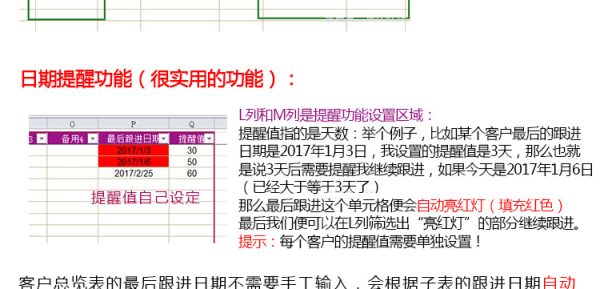
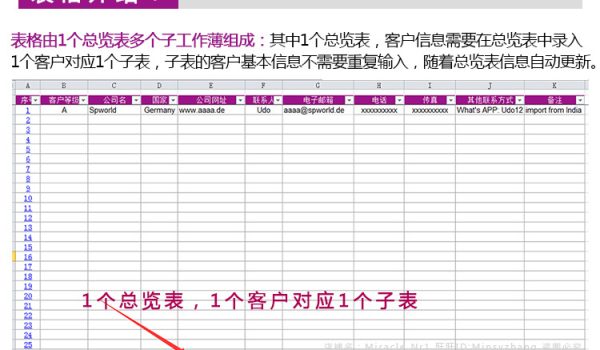
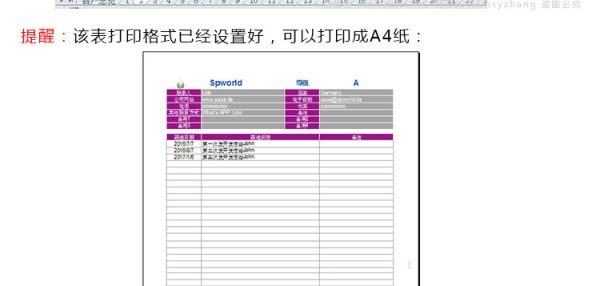
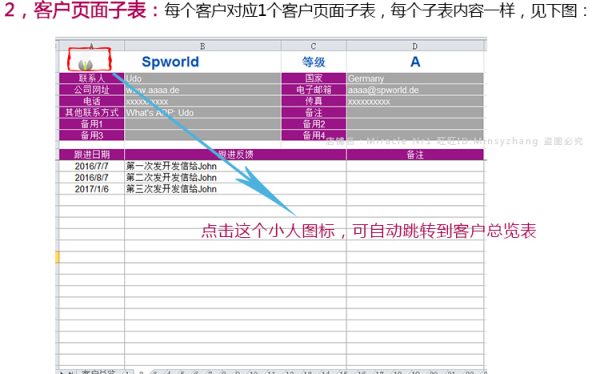
For a one-person SOHO with 30–50 active clients, Excel is enough. Lock the columns, sort by "next follow-up date" every week, and 10 minutes a day gets you through everyone you need to contact.
Once you pass 100 clients, problems start showing up: filtering slows down, the same company gets entered on two rows, and quote versions stop matching. Two people sharing one file is worse — who changed what, who followed up, which step the quote reached, all of it gets asked in a group chat.
A concrete scene: you come back from Canton Fair with 60 business cards and dump them all into one sheet. Three months later you want "German clients quoted FOB last October who never replied" — and you're scrolling row by row. When you prospect from directories like the 120th Canton Fair buyer list, fill in the source field and follow-up date up front; it's far less work than backfilling later.
Winning a new client costs about 5 times what it costs to keep an existing one. The point of a follow-up sheet isn't storing data — it's reminding you on time to circle back to the people you've already quoted, already sent samples to, and who haven't ordered yet.
What 8 columns must a usable export follow-up sheet have?
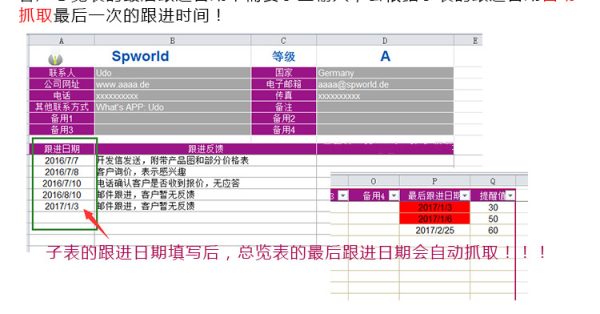
Our research says fewer than 8 columns leaves you short on information, and more than 15 means nobody fills it in. These 8 are the most reliable minimum set.
| Column | What to enter | Example |
|---|---|---|
| Customer ID | Unique value; never use the company name as the key | DE-0042 |
| Company name + country | English name + country code | Müller GmbH / DE |
| Lead source | Trade show / Google / platform / referral | Canton Fair |
| Current stage | 5 fixed options, no free text | Quoted |
| Last contact date | Date of the most recent exchange | 2026-03-11 |
| Next follow-up date | Required — no date means no plan | 2026-03-25 |
| Quote number + MOQ | Quote reference and minimum order quantity | Q-2026-0311 / 500pcs |
| Blocker note | One line on why it stalled | Waiting on customer to confirm packaging |
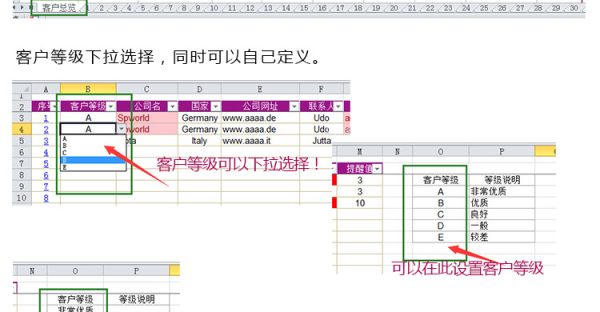
The "current stage" column must use fixed values only: first contact / quoted / sample sent / negotiating / closed. Let people free-type and a month later you'll have a dozen spellings, and filtering is dead.
How do you make Excel remind you to follow up?
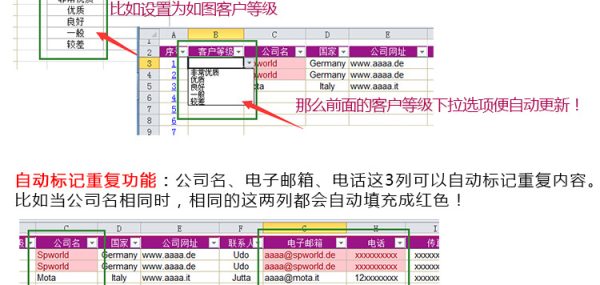
A spreadsheet won't speak up on its own — you have to install the switches. Do this in order and it takes half an hour.
- Data validation on the stage column: select the whole column → Data → Data Validation → List, and hard-code the 5 stage values.
- Red-flag it with conditional formatting: select the whole "next follow-up date" column → Conditional Formatting → use a formula to test whether the date is today or earlier, and fill red.
- Add a "days overdue" column: formula =TODAY()-next follow-up date. A positive number is how many days you've been dragging.
- Every Monday morning, sort ascending by "next follow-up date" and work the red rows from the top down.
- On the 1st of each month, save a copy with the month in the filename to your company cloud drive — don't leave it local only.
Archiving email separately is safer. Use dedicated email management software for export salespeople to file quotes, samples and contracts in folders by customer, so you don't have to dig through chat logs. For deals closed on WhatsApp, don't treat the chat history as your only proof — always write the quote number back into the sheet.
How is an Excel sheet different from an export CRM?
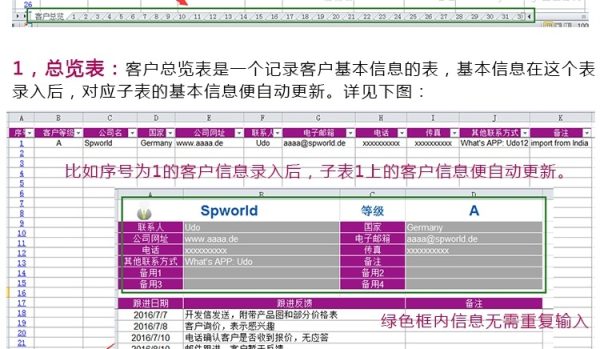
The price gap isn't about the feature list. It's about who remembers things for you.
| Item | Excel follow-up sheet | Export CRM |
|---|---|---|
| Annual cost | 0 — your existing Office or WPS | Tens of thousands per year |
| Time to learn | Half an hour | 3–7 days |
| Multi-user work | Easy to overwrite each other; no change history | Every action is logged |
| Automatic reminders | Conditional formatting + checking it weekly yourself | Pushed to email and phone when due |
| Email archiving | Manual copy and paste | Sent and received mail auto-linked to the customer |
| Data security | File sits locally; risk of deletion or being taken away by leavers | Tiered permissions, server-side backup |
| Best for | 1–2 people | 3 or more people |
One line to decide it: a CRM charges you for collaboration and automation, not for storing customers. For a solo operator, the gap between a sheet and a CRM may be worth less than one follow-up you don't drop.
Four signals it's time to switch to a CRM
- You're past 100 active clients and filtering and sorting have clearly slowed down.
- You have 2 or more salespeople, and the same customer gets worked twice by two people.
- Inquiries come from 3 or more channels (website form, WhatsApp, trade shows, platform messages) and the information sits in four places.
- The boss wants to see who followed up how many clients this month and how many deals closed, and it can only be compiled by hand.
Before you switch, do one thing: export the sheet to CSV, map the fields one-to-one to the CRM, and carry over historical quote numbers, MOQ and stages. Losing data in migration hurts more than not migrating at all. Check the version and pricing comparison before you pick a system — don't pay an annual fee for features you'll never use.
Before inquiries reach the sheet, get these 3 things right on your site
The sheet is where inquiries land; the ones you never catch are lost on the website side. Three hard checkpoints for independent-site inquiry conversion in 2026: the first screen says "who you are + what you solve" within 3 seconds; product pages carry a spec table and MOQ; forms ask only for name, email and requirement — every extra field drops the submit rate. Run an audit of the inquiry path on your B2B export website in that order.
SSL is basic. Sites without it get flagged "Not secure" by Chrome, the customer closes the tab on the spot, and not a single row gets added to your follow-up sheet.
Search results pages changed shape in 2026 too. Ahrefs data: queries with AI Overviews saw about a 34.5% drop in click-through on the first result; Pew measured that when an AI summary appears, users click traditional results about 8% of the time, versus about 15% without. Rankings haven't changed — AI just summarizes pages that already ranked. The fix is unglamorous: put the conclusion sentence in the first paragraph, so it works both as the snippet for organic results and as the sentence AI is willing to quote. Write that into your content standards when you do export website building; it's cheaper than fixing the copy later.
FAQ
I run export sales alone — Excel follow-up sheet or buy a CRM?
Under 50 active clients, start with the sheet: zero cost, half an hour to learn. Past 100 clients, or once someone starts splitting the work with you, buy the CRM.
How many days should the "next follow-up date" be?
3 days after quoting, 7 days after sending samples, 30 days after closing for a check-in. Adjust to your product cycle: machinery can stretch to 15 days, fast-moving consumer goods tighten to 3.
Is it safe to keep customer data in Excel?
No. Encrypt the file, export a backup monthly, and have salespeople hand over and export their contacts before they leave. If several people share it, put it on the company cloud drive with tiered permissions — don't send files over WeChat.
For an independent site in 2026, do I need separate optimization for AI search?
No separate track needed. Google has stated that appearing in AI Overviews requires no extra structured data or special files — good SEO is good GEO. Writing conclusion sentences into the first paragraph beats chasing tools.