

The official WhatsApp support contact form (whatsapp.com/contact) has no visible submit button. Your browser isn't broken. Press Ctrl+A on the form page and a "Next" button appears at the bottom right away. After the page changes, press Ctrl+A once more to reveal "Submit question". When you see "Your question has been sent", the submission went through, and support usually replies within 3 working days.
Why the WhatsApp support form has no submit button
The form renders in steps. Both the "Next" and "Submit question" buttons are written into the page, but only appear after the front-end script runs. If the script never fires, the buttons stay hidden — you've filled everything in and have nowhere to click.
The page structure hasn't changed in 2026. Three causes account for most failures: opening a secondary link with ?subject=messenger pasted in directly, a browser extension that blocks scripts, or having web translation or reading mode turned on. Opening it in a mobile browser or an in-app WeChat browser fails even more often.
It's almost certainly a front-end bug, unrelated to your account status. Whether the buttons appear has nothing to do with whether you're banned or able to log in. Don't judge the two together.
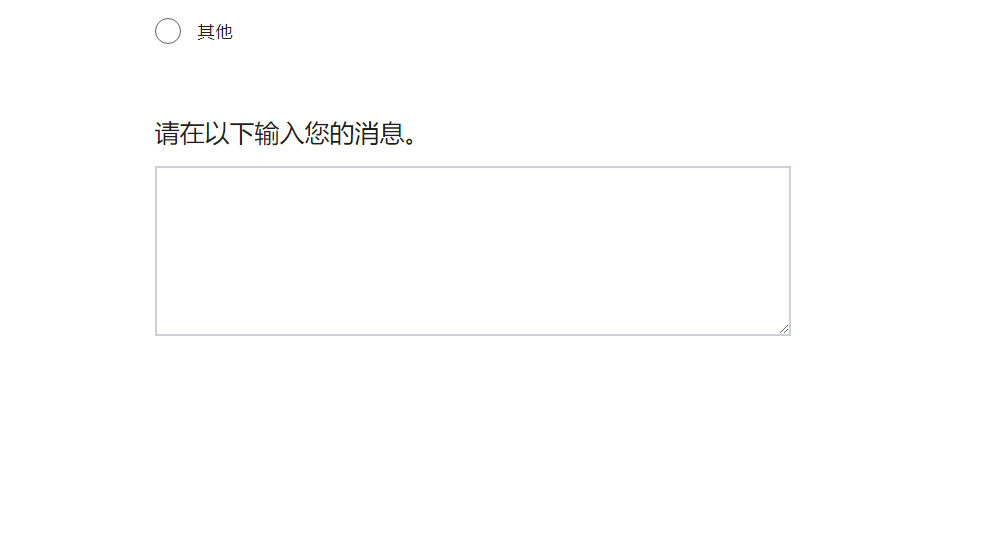
The Ctrl+A three-step method: make the button appear
- On a computer, open https://www.whatsapp.com/contact/?subject=messenger in Chrome or Edge. Don't use a phone.
- Enter your phone number (with country code, e.g. +86), email and problem description.
- Press Ctrl+A (Command+A on Mac) to select the whole page. When the button appears, click "Next".
- After the page changes, press Ctrl+A again and click "Submit question".
- When you see "Your question has been sent", you're done. Wait for support to reply.
Selecting all only forces the hidden elements to re-render. It won't actually select the text. If nothing happens, click a blank area of the page first, then press again.
If the button appears and then disappears, the script is reloading repeatedly. Switch to an incognito window, turn off ad blockers and try again. The whole process takes under two minutes — the only hard part is knowing to press that key.
How to fill the four fields: one typo costs you three days
| Field | Correct format | Common mistake |
|---|---|---|
| Phone number | With country code, e.g. +8613800000000, no spaces or hyphens | Only the 11 digits, or hyphens added, so support can't match your account |
| A Gmail or business address you use daily | Wrong domain or a disposable address, so replies land in spam | |
| Problem description | In English: when it started, what happens, what you've tried | Just "can't login", which leads to two or three rounds of back-and-forth |
| Account type | State whether it's a personal number or WhatsApp Business | Leaving it out, so support has to confirm first |
Follow this template: on [specific date], the following started happening; on which device I tried what; screenshot attached. English doesn't need perfect grammar — being clear beats being polished.
Upload screenshots to an image host or cloud drive first, then paste the link into the description. The form doesn't accept attachments, so a link is the easiest workaround.
No response after submitting? How to follow up
The official turnaround is about 3 working days, weekends excluded. If nothing arrives on day 4, check your spam folder and Promotions tab first — replies get filtered there often.
Don't submit the same issue three times a day. Duplicate tickets go back into the queue and actually slow things down. If you must chase it, reply to the original email with extra details so support can match your ticket number.
If your account shows "For security reasons, we can't let you log in", that follows a different path from a normal enquiry. Start with the steps for handling a WhatsApp login block for security reasons. If you can't receive verification codes, see the roundup of verification code and ban issues — it saves a round of back-and-forth with support.
Three backup routes when the form won't work
- Open a ticket in the app: Settings → Help → Contact us. Submitting inside the app automatically includes your device model and version, which makes troubleshooting easier than the web form.
- Self-service in the help center: Verification codes, QR codes and chat recovery all have ready-made steps. In most cases you don't need to wait for support.
- Official social accounts: DM @WhatsApp on X. Public channels sometimes respond faster than the form, but never post your phone number in a public tweet.
What all three have in common: give complete information in one go. Missing device model, missing screenshots, missing timestamps — support can only send a template reply and you start another round.
If the Windows desktop version won't install and the QR code keeps spinning, the problem is the app store step. The fix is covered in what to do when WhatsApp from the Microsoft Store keeps spinning.
What exporters should really guard against: customers can't reach you when your account fails
The support form can fix an account. It can't fix lost enquiries. The moment your account is suspended, both existing customers and new leads on WhatsApp go silent — and that costs far more than the waiting time.
Keep at least three contact channels on your own site: a floating WhatsApp button, a business email and an on-site enquiry form. Limit the form to name, email and requirement — fewer fields mean higher submission rates, and it's the cheapest conversion win available.
Let a bot handle messages outside working hours: auto-reply to common questions, log the key points, and follow up manually the next day. See building a WhatsApp auto-reply bot with AI. Whether your product pages show specs, MOQ and lead times directly decides whether visitors leave their contact details — check yours against the page structure of a B2B export website.
FAQ
The WhatsApp support form has no submit button — is my browser broken?
No. The buttons are in the page and only appear after the script runs. Pressing Ctrl+A to select the page makes them show up, and Chrome with blockers disabled has the highest success rate.
Can I submit this form on a phone?
Not recommended. Mobile browsers and in-app browsers fail to trigger the script far more often. Chrome or Edge on a computer is the safest option.
I pressed Ctrl+A and still can't see "Next". What now?
Click a blank area of the page first, then press again. Or try an incognito window and turn off web translation and ad blockers. If it still fails, use Settings → Help → Contact us inside the app instead.
How long until I get a reply?
Usually around 3 working days. If that passes, check spam first, then reply to the original email with more details. Don't open a new ticket.