

WhatsApp Business for Android and the personal app can live on the same phone. They don't interfere with each other, and both are free to download. The real difference is features: Business gives you a business profile, a product catalog, customer labels, quick replies and automated replies. The personal app makes you answer every chat by hand. Get ten or more enquiries a day and you start losing orders.
Can Business and Personal run on the same phone?
Yes. They appear as two separate apps in the app store with different icons. The personal app is a green phone bubble; the Business app carries a “B”. Sign in to each with its own number, and messages arrive separately, so notifications don't overwrite each other.
The only thing to watch is the phone number. One number can only hold one WhatsApp identity. If you register Business with a number already used on Personal, the app will offer to migrate that number over, and Personal stops working once it does. The safe play is a dedicated SIM for business and leave your personal number alone.
Once volume grows, one number is usually not enough. Sales, after-sales and the boss each want their own, and customers get passed between three of them. That is the point to look at the API rather than buying another phone. More on that below.
What's the feature gap? Three versions in one table
| Feature | Personal | Business (free) | Business API |
|---|---|---|---|
| Business profile (address, website, hours) | No | Yes | Yes |
| Product catalog | No | Yes | Yes, can connect to your backend |
| Customer labels and groups | No | Yes | Yes, in bulk |
| Quick replies | No | Yes | Yes |
| Greeting and away auto-replies | No | Yes | Yes, can run a bot |
| Several agents on one number | Not supported | Not supported | Supported |
| Bulk messaging | Broadcast lists, saved contacts only | Broadcast lists, saved contacts only | Template messages, approval required |
| Cost | Free | Free | Billed per conversation |
The two most valuable rows are “several agents on one number” and “bulk messaging”. The free Business app still means one person on one phone. When orders peak, buyers are waiting, your rep is scrolling through old chats, and the order goes to a competitor.
Business also has an entry point people overlook: click-to-chat straight from a Facebook or Instagram ad. A customer taps the ad and lands in your WhatsApp, with no need to search for or save your number. Two steps fewer makes a visible difference to conversion.
Install WhatsApp Business on Android in 4 steps
- Open Google Play, search “WhatsApp Business” and check the developer is WhatsApp LLC. Don't download a lookalike with a similar name.
- If the phone has no Google services, download the APK from whatsapp.com/business and allow “install unknown apps” for your current browser in settings.
- Open the app, enter your business number and wait for the SMS or voice code. Use a dedicated business SIM here, not your personal number.
- Fill in business name, industry, address and website, upload a profile photo, then add your main products with images and prices to the catalog.
Chinese Android phones often ship without Google services, so the official APK is the easiest route. Avoid “WhatsApp Business” downloads from third-party app markets. A repackaged installer can cause login errors and may even get your account flagged.
Plenty of people get stuck at installation: no verification code, or repeated security warnings. Go through how to fix a missing WhatsApp verification code and login failure instead of reinstalling again and again. Too many reinstalls only make it worse.
Once installed, set up these 3 features first
Use the Business app without configuring anything and it behaves just like the personal one. These three features take twenty minutes and can halve your daily reply time:
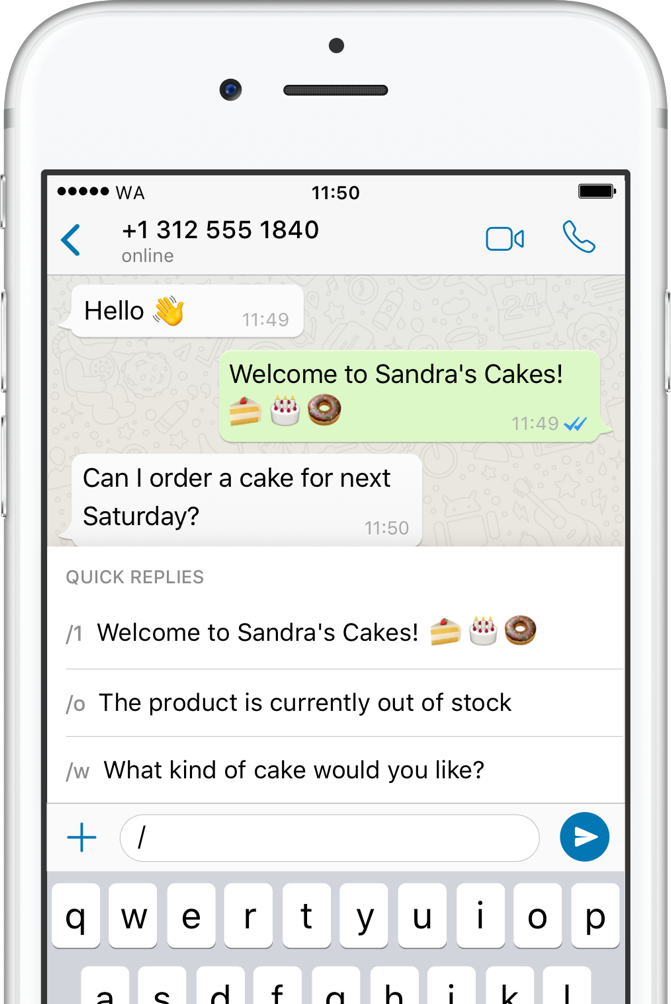
- Quick replies: save your price range, MOQ, lead time, payment terms and shipping notes as short phrases. Type “/” in the chat box to pull them up instead of retyping.
- Greeting and away messages: write a welcome message that says who you are and what you sell. Add an away message for outside business hours telling customers when you'll reply. Enquiries that come in at midnight are still there in the morning.
- Labels: start with four — “to quote”, “sample sent”, “ordered” and “repeat customer”. Once you have a few hundred contacts, finding people by scrolling chat history is painfully slow.
Build labels around your sales process, not by region. When a customer moves from “to quote” to “ordered”, the label changes and the follow-up rhythm becomes obvious. Any group stuck on “sample sent” for more than two weeks deserves a proactive nudge.
Put your number where customers can see it: site footer, a floating button on product pages, the header of your quotation sheet, your TikTok bio. When you put your independent store link in your TikTok bio, add a line saying “message us on WhatsApp for pricing” — and your incoming chats will clearly increase.
When should you move from the Business app to the WhatsApp API?
Three signals tell you it's time. One: two or more salespeople need to reply to customers at once. Two: you handle more than one or two hundred messages a day and manual searching starts causing mistakes. Three: you want enquiries to land automatically in a spreadsheet or CRM instead of being copied by hand.
The API isn't an app you install. You connect through a provider, bulk template messages go through approval, and you pay per conversation. What you get is a bot for first responses, multi-agent collaboration and a full record of every customer conversation. For automated replies, see how to build a fully automated WhatsApp AI chatbot and start with one simple job: auto-reply to every incoming message with a welcome note and your product catalog.
Customers still come from your website in the end. A B2B export website that states specifications, MOQ, certifications and lead times up front lets buyers work out what to ask before they message you, which makes every conversation more efficient. If your site isn't built yet, check the process and timeline for our foreign trade website building service instead of explaining the basics over and over in WhatsApp.
FAQ
Does WhatsApp Business cost anything?
It's free to download and free to use. Business profile, catalog, labels, quick replies and auto-replies cost nothing. You only pay per conversation when you connect the API for bulk sending and automation, billed through your provider.
Can I register Business with my personal number?
Yes, but that number migrates from Personal to Business and the personal app stops working. If you want both, prepare two different phone numbers and register each separately.
Can Business send bulk messages to customers?
You can send broadcast lists, but only to people who have saved your number. Blasting strangers tends to get you reported, and the account gets limited or banned. Don't test it on your main number.
What if no verification code arrives after installing?
First confirm the number can receive SMS normally, then try “receive the code by phone call”. Don't tap resend repeatedly within five minutes. If it keeps failing, change your network and try again a few hours later. The full troubleshooting steps are in WhatsApp login and verification code troubleshooting.