

Alibaba Image Translation swaps the Chinese text on your product images for English, Spanish or another target language while keeping the original layout and background. Open translate.alibaba.com, choose Image Translation in the middle of the page, set your source and target languages, upload the image, confirm in the preview on the right, then click download in the bottom-right corner. One image takes under a minute. It is handy for sales reps who need a product or detail-page image fixed without waiting on the design queue.
How to Use Alibaba Image Translation: Four Steps to a Finished Image
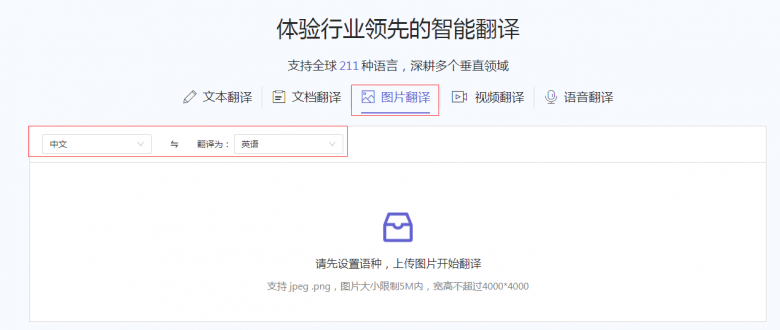
Step one: open translate.alibaba.com in your browser. No software to install, no complicated backend login. Step two: set the translation type at the top of the page to Image Translation, choose Chinese as the source language and pick the language of the market you sell into, such as English, Spanish or Arabic. Step three: upload the image. Common formats are supported. Wait while the text is detected and overwritten. Step four: check the result panel on the right. Are the text position, colour and background natural? If it looks right, click download in the bottom-right corner of the image.
In our tests, Chinese product images translated into English kept buttons, labels and spec-table frames in place. One thing to watch: English runs longer than Chinese, so font sizes get squeezed. Short taglines work best; long blocks of description text tend to crowd the layout.
Can the Translated Product Images Go Straight on My Website?

Yes, but choose your images carefully. Product shots on plain backgrounds with text, spec comparison charts and feature callout images are usually ready to publish as they are. Promo graphics packed with Chinese display lettering, calligraphy fonts or gradient outlines tend to misalign after machine detection and replacement, so plan to fix them by hand in your design software.
Technical terms are the other common problem. Machine translation handles words like stainless steel and rated power fine, but industry abbreviations, model numbers and units often drift. Mark model numbers and units separately before you upload, then check them one by one. That is faster than scanning the whole image afterwards. Text on an image is the first thing a customer sees, and one wrong spec can cost you an inquiry. The English copy in your product page body matters just as much. See tips and cautions for writing articles and product descriptions with ChatGPT to keep image text and page text on the same terminology.
Batch Image Translation: Quotas and When to Use It
The public entry point is fine for testing a single image. To process dozens or hundreds at once you need the batch channel. Ask customer service for the entry point and how to enable it. During the beta, you can import 50 images at a time with a 500-image daily quota. For most small and mid-sized exporters, that covers a full series of new product images.
For batch work, group images by series. Images in the same series share a language and layout, so check one template and spot-check the rest. Keep images for different markets in separate folders so your English site never picks up a Spanish image by mistake.
| Use case | Recommended approach | What to watch |
|---|---|---|
| Single hero image, urgent | Online translation on the website | Check whether the font size was squeezed |
| One series, 20–50 images | Batch channel | Use one glossary for the series |
| Campaign graphics with display lettering | Fix in design software after translating | Watch for shifted text and broken outlines |
| Images for multilingual sites | Separate folders per market | Avoid mixing languages |
Beyond Image Translation: What Else a Multilingual Site Needs
Translated images only help customers understand the picture. Page titles, product descriptions, spec tables, MOQ and certification details all need versions in the same language. Otherwise the image is in English, the body copy is in Chinese, and the visitor leaves. The first screen has to answer who you are and what you solve within 3 seconds, in any language.
Technical details on multilingual pages get overlooked. Give each language its own URL and add hreflang tags instead of switching languages with JavaScript. Set fixed width and height on images to avoid layout shift, serve the hero image with an img tag and set the fetchpriority attribute to high, and keep LCP under 2.5 seconds. On mobile, about 53% of users leave if loading takes over 3 seconds. If your site structure and conversion path are broken, no translation will bring inquiries. Start with why your foreign-trade website gets no traffic or inquiries as a self-check.
5 Pitfalls to Avoid in Image Localization
- Check model numbers, units and certification IDs line by line, not just the overall look.
- English is longer than Chinese. Prefer short taglines and split or trim long sentences into two lines.
- Arabic and Hebrew read right to left, so check the layout direction after translating.
- Prices, lead times and promo messages on images expire. Reconfirm them before switching markets.
- Rename downloaded files with your original naming rules so they are easy to swap later and to write SEO image alt text.
Lock this process in and one salesperson can get through a full series of images in a day. If you want the multilingual structure planned from the build stage, look at how B2B foreign-trade websites organize their pages, or compare plans and pricing to see which option fits you.
FAQ
Is Alibaba Image Translation free?
The image translation entry point on the website is available directly. Upload a single image and you get a result. Batch processing has to be enabled separately, so confirm the cost and entry point with customer service.
Will the translated text on the image be misaligned?
Product images on plain backgrounds with standard fonts usually will not shift. Promo graphics with Chinese display lettering, gradient outlines or dense layouts often do, so adjust them by hand in your design software afterwards.
How many images can I translate at once?
During the beta, the batch channel accepts 50 images per import with a daily quota of 500. For small and mid-sized exporters, that is usually enough to launch a new series.
Can image translation replace human translation?
Not entirely. Machine translation speeds up short taglines and spec labels on product images, but detail-page copy, contract terms and certification statements should still go through a human or professional translator, especially industry terminology and regulatory wording.