

In 2026 a scraper can pull thousands of images off competitor sites in ten minutes. But only two things decide whether those images can go on your site: permission and page performance. Never put product images on a product page without written permission. For images you do have permission for, compress them under 200KB, set fixed width and height, and add fetchpriority to the one above the fold.
Can You Still Bulk Scrape Competitor Images in 2026?
Yes. Nothing blocks you at the tool level. With software like Houyi Collector, you paste in a category page URL, tick the image field, and export a whole site's product images in minutes. The tool is not illegal. Using someone else's images as your own is.
What has changed is the environment. In 2026, Google image search and AI overviews display images directly, so a customer can save a picture more easily than ever. The flip side: a competitor can reverse-search your site in seconds.
So the safer play now is “collect to study, not to use”: treat competitor images as research. See how many angles they shoot, what scenes they pair, how spec images are laid out, and which detail image carries the specs. If you really want them on your site, swap in your own shots or originals your supplier licensed. For the bigger picture on how competitors structure product pages, see this method for analyzing competitor websites.
Which Three Kinds of Images You Can Use, Need Permission For, or Should Never Touch
Sort before you start. Most of what you scrape is not “download and use”.
- Use directly: your own factory, workshop, sample and packaging photos; originals a supplier has stated in writing may be used on your website; CC0 stock assets.
- Get permission: images a supplier only verbally said you could “use freely” — confirm by email; customer factory audits and case site photos — need customer consent; photos with models — image rights apply.
- Never touch: hero images carrying a competitor's watermark or logo; official brand renders; full image sets from Alibaba.com or Amazon detail pages; scanned certificates belonging to a competitor.
The shoot you skip by reusing one image might save a few hundred dollars. A lawyer's letter or a platform complaint costs far more. Western buyers are especially sensitive to stolen images — get spotted at a trade show using a competitor's website photo and the deal is gone on the spot.
6 Steps to Bulk Download Images with Houyi Collector
- Download and install Houyi Collector, then create a new “smart collection” task.
- Open the target site's product category page. Do not start from the homepage — copy the listing page URL into the collection box.
- After auto-detection, keep only the image (src) field in the field list. Uncheck title, price and description.
- Test-run 2 pages first. Confirm you are pulling originals rather than _100x100 thumbnails, then set the pagination rule and maximum page count.
- Go to “download settings”, tick image download, choose a save directory, set concurrency to 3–5 and turn on URL de-duplication.
- Start the crawl. After export, build folders by SKU or product category so you can compare them against your own products line by line.
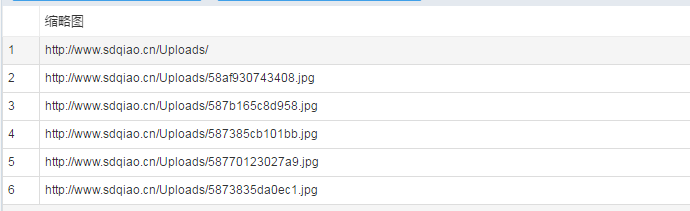
Three frequent traps: you grabbed thumbnails, the same image downloaded at five different sizes, and every file name is gibberish. Test-run two pages before the full crawl and you save half the rework.
Scraped Images Slow Your Site Down — Watch These Three Thresholds
Images exported from a competitor's detail page are usually uncompressed JPEGs over 2000px and 1–3MB each. Upload them as-is to WordPress and your LCP is beyond saving. On mobile, about 53% of users leave when loading takes over 3 seconds (Google data).
| Metric | 2026 “good” threshold | Most common scraping mistake | Fix |
|---|---|---|---|
| LCP — Largest Contentful Paint | ≤ 2.5 s | Hero image uncompressed, or set as a CSS background-image | Use |
| INP — Interaction to Next Paint | ≤ 200ms | GA4, Meta Pixel and live chat scripts all loading at once | Defer third-party scripts until the user's first interaction |
| CLS — Cumulative Layout Shift | ≤ 0.1 | No width/height on images, so the whole page jumps while loading | Set fixed width/height on every image, or reserve space with aspect-ratio |
The hero image must be an tag with fetchpriority="high", not a CSS background-image — the browser only discovers the image after parsing the CSS, which drags LCP down for nothing. Set fixed width/height on every image and CLS settles immediately.
Changes do not take effect right away. Core Web Vitals uses a rolling 28-day window of real user data, so wait four weeks before checking Search Console. Don't conclude it failed the next day.
5 Fixes Before You Upload
- Compress: 1200–1600px wide is enough. Convert to WebP and keep each file under 200KB.
- Rename: use product-name-model.webp. Never leave IMG_2043.jpg.
- Write alt text: English, product name plus material plus use, one clear sentence. Don't stuff keywords.
- Set fixed dimensions: every image carries width/height, with aspect-ratio holding the layout on responsive views.
- Split loading: no lazy on the hero image; add loading="lazy" to every image in the detail section.
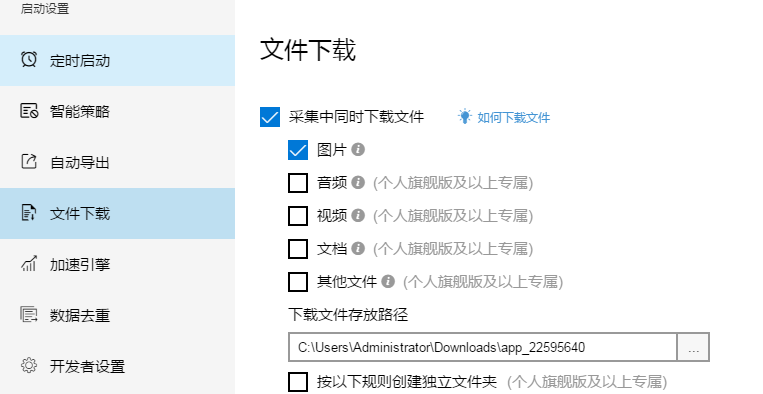
For 500 images, Squoosh or a WordPress bulk WebP plugin finishes in about fifteen minutes. Spot-check 20 afterwards for blurry output, transparent backgrounds turned black, and stretched dimensions.
Images Are Just Assets — Inquiries Come From Product Page Structure
Pretty pictures won't earn an inquiry if the product page can't answer three things: who you are, what specs you offer, and what the MOQ is. The first screen has three seconds to make clear whether you are a factory or a trader, your main categories and your main markets. Product pages need a spec table and MOQ.
Fewer form fields is better. Name, email and requirement converts best. Add phone, company size and annual purchase volume and half the people walk away.
If images and copy are done and inquiries still don't come, work through why your foreign trade independent site has no traffic or inquiries in that order. If you want someone to get images, structure and performance right in one pass, see the website building service and B2B foreign trade website options.
FAQ
Is bulk downloading images from competitor websites copyright infringement?
Yes. Image copyright belongs to the photographer or the party who commissioned the shoot. Being able to download it does not mean you have a license. Putting it on your own site is reproduction and communication to the public. If you genuinely need it, ask the supplier for an email stating the images may be used on your website, or reshoot them yourself.
Why can't the scraper grab the images?
Usually the images are lazy-loaded and the src in the source code is a placeholder. Increase the wait time, enable scroll loading, or target the data-src field instead. That normally gets them out.
Can I upload scraped images straight to WordPress?
Not recommended. Compress, convert to WebP, rename and write alt text first. Uploading originals bloats your media library to several GB and pushes LCP past 3 seconds.
Will a lot of images noticeably slow the site down?
Yes, depending on how you handle them. With lazy loading site-wide, fetchpriority on the hero image and fixed dimensions on every image, a 500-image site can still keep LCP under 2.5 seconds.