

Bottom line first: in 2026, most Facebook bans are not caused by bad copy. They come from a dirty login environment and a new account that moves too fast. One account, one fixed clean IP, one fixed device. Register with real identity. For the first 14 days, add no more than 10 friends a day — warm up the account before you start prospecting. Follow this process and most new accounts survive.
Why does Facebook still target Chinese exporters' accounts in 2026?
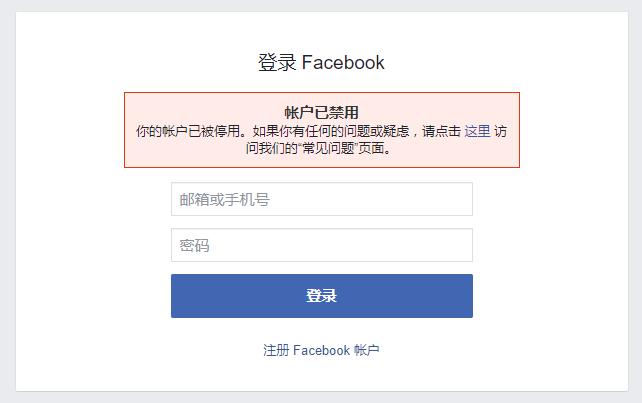
Facebook has over 3 billion monthly active users worldwide. The platform's pressure is not on acquisition but on retention. Its test for whether an account disturbs other people is simple: adding a lot of friends in a short time, posting the same ad in multiple groups, and being reported by more than one user. When those signals stack up, the system disables first and lets you prove you are a real person afterwards.
The biggest trap for exporters is running Facebook like a WeChat Moments feed for a micro-business: a dozen product photos a day, the same English pitch copied into dozens of sourcing groups. Real users don't do that. Bulk tools do. The platform's detection logic is built around exactly that.
Then there is environment. The same account goes through a domestic route today and switches to a US node tomorrow, and browser cache and device fingerprint change with it. What the review team sees is 'this account doesn't look like one person using it normally' — and the ban notice arrives.
Which actions carry the highest risk? Check yourself against this table
| Action | Risk level | Likely platform response | Recommended practice |
|---|---|---|---|
| Switching between multiple accounts on the same computer and the same browser | High | Bulk disable, face or ID verification required | One machine, one account; separate browser profiles for extra accounts |
| Adding dozens of friends and joining a dozen groups on registration day | Very high | Immediate disable, appeal only | Max 10 a day for the first 14 days, spread across the day |
| Posting the same ad copy in a dozen sourcing groups | High | Posting restricted after reports | Write each one separately; no more than 3 groups a day |
| Free proxies and shared nodes, switching IP often | Very high | Flagged as abnormal login, account locked | One fixed clean line; no region hopping after registration |
| Fake name, birthday and profile photo | Medium | Can't prove you are real during appeal, rejected | Register with real ID details, use your own photo |
The first two rows are the main cause of new-account bans. Neither needs any 'growth hack'. Skipping one step keeps an account alive much longer.
How do you warm up a new account in the first 14 days?
- Days 1–3: Complete your profile only. Real photo, cover image, work history, linked company Page — leave nothing blank. Don't add anyone during this period.
- Days 4–7: Browse normally for 20–30 minutes a day. Watch videos, like industry Pages, join 1–2 sourcing or industry groups, read only.
- Days 8–10: Start adding friends, 5–10 a day. Prioritise people with shared groups or mutual friends — higher acceptance, lower report rate.
- Days 11–14: Reply in groups. Answer questions instead of posting products. 1–2 a day, with specific content, such as lead times for a material or certification requirements in a market.
- Day 15 onward: Hold steady at 10–20 targeted customers a day, plus 1–2 original posts on your Page daily. Keep adding and posting at an even pace — don't sprint in one day.
Pace matters more than volume. 10 targeted friends a day is 300 a month — a far better trade than 100 a day followed by a ban. During warm-up, don't stuff pricing into your bio, cover image or group announcements. That is the first thing competitors report.
How do you isolate IP and devices properly?
The principle is one account, one environment. Register new accounts on a computer that has never logged into Facebook, or in a brand-new browser profile. Clear cookies and cache before registering. Never register in a browser that has already been used for another account.
Don't use free proxies or shared nodes. You have no idea how many banned accounts sat on that IP before. Facebook links accounts by IP, so a new account on a dirty IP gets stopped right after registration. Paid static residential IPs or dedicated lines are far more stable and cost only a few dozen yuan a month — cheaper than losing an account you warmed up for three months.
For the first month after registration, keep your login region as stable as you can. If you travel and must change networks, log in once from your usual device first so the system remembers it. Changing device triggers verification more easily than changing IP.
Don't copy everything on your Page either. Writing posts with AI is fine, but rewrite them in your own voice and add your own industry detail. Pasting generated English paragraphs reads exactly like every marketing account out there. Our tips and pitfalls for writing product descriptions with ChatGPT covers this in more detail — use it as a checklist.
How should you post so you don't look like a marketing account?
Aim for an 8:2 mix: eight posts of industry info, factory floor, container loading, trade shows, inspections — two posts of product. A phone video shot in the workshop usually gets more engagement than a retouched product photo, because it looks like a real person posted it.
Give value first in groups. Answering a question about lead times or certification once brings more inquiries than ten ads. To see how competitor Pages actually post and set up their call-to-action buttons, read analyzing competitor websites to improve your own site — the method works the same on a Facebook Page.
One more thing people miss: Facebook is only the traffic entrance. Visitors need somewhere that holds them. If your landing page can't explain in three seconds who you are and what problem you solve, they leave anyway. Read a foreign trade independent site with no traffic or inquiries and B2B foreign trade websites together — connect social traffic to site conversion.
Account banned — how do you appeal and get it back?
First check the notice type. If it says 'unusual activity, verification required', use the self-service flow: link a phone number, receive the code, upload a photo of yourself as prompted. In most cases it is restored on the spot.
If it says 'account disabled', appeal is the only route. Cover three points: you are a real person using your real identity, what industry you are in, and that the account is used for normal sourcing communication with overseas customers. Attach a photo of your ID, keep the tone sincere, and say everything in one go.
- Don't submit a dozen appeals a day. Repeat submissions are treated as spam and slow you down.
- Don't register a new account immediately on the banned IP. You can get linked and taken down too.
- Keep your customer communication records during the appeal — after recovery they prove the account is for business.
If the account can't be saved, don't force it. Export customer emails, WhatsApp contacts and LinkedIn profiles from your Page and chat history. Those are the assets you can take with you.
Frequently asked questions
How many Facebook accounts can one person run?
Platform rules say one per person. If you genuinely need separate operations for several markets, give each account its own browser environment and fixed IP, and tie each to real identity details. If one gets checked, the others can be linked and disabled too.
Should I register as a company or as an individual?
Register your personal profile with real personal details, and put the company information on the Page. The profile is your identity; the Page is your storefront. If you fill in a fake name, you can't produce an ID when something goes wrong, and an appeal is basically hopeless.
My new account hit the friend-request limit — should I do anything?
Stop first. Continuing to add people and send messages during the limit turns a temporary restriction into a disable. Pause for a few days — browse, like, watch videos as normal — and the limit usually lifts by itself. After that, keep it under 5 requests a day.
What's the difference between a Page ban and a profile ban?
If your personal profile is banned, you lose admin rights to every Page you manage. If a Page is banned, the profile usually stays. So export your customer list to your own site backend and email list regularly — don't keep it only on Facebook.